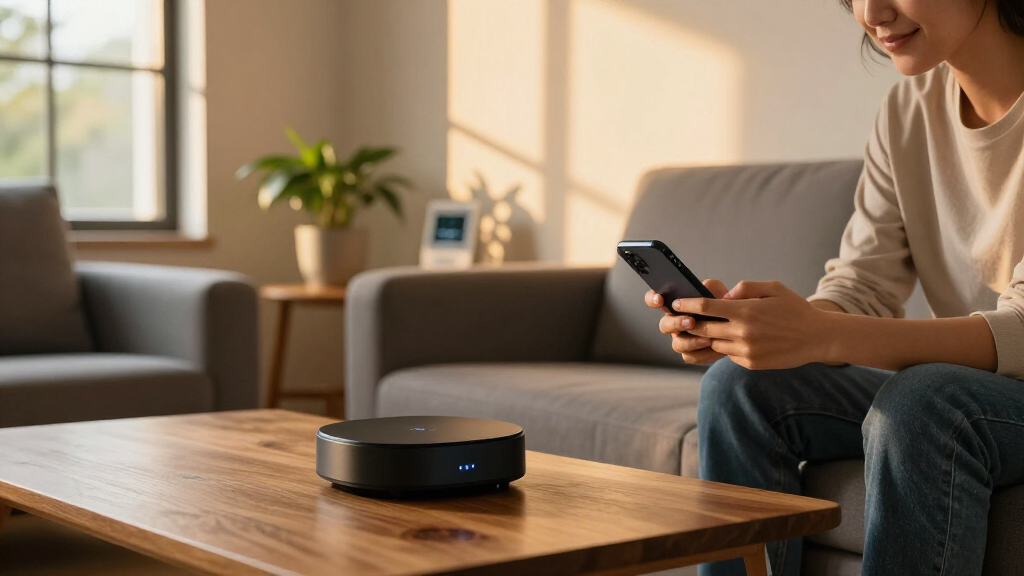

Smart home automation hubs are the control center that ties your lights, locks, sensors, and thermostats into one system, and the right one depends heavily on which wireless protocols your devices use and how much control you want over your automations. For most buyers, the Hubitat Elevation C-8 Pro is the best overall pick, combining Zigbee, Z-Wave, and Matter support with fast, fully local automations that keep working when the internet drops. If you want maximum power at a friendly price, Home Assistant Green delivers unmatched customization, while the Aqara Hub M3 is the strongest choice for Matter and Thread adoption on a budget. The main tradeoff in this category is between plug-and-play simplicity and deep control: closed ecosystems like SmartThings are easier to set up but depend on the cloud, whereas platforms like Hubitat and Home Assistant demand more setup effort in exchange for speed, privacy, and reliability. Read on for the full breakdown of all nine hubs.

Get home appliances delivered free with Prime
- Fast, free delivery on millions of items
- Prime Video, Amazon Music and more included
- Member-only deals all year
Complete the kit


Key Takeaways
- Protocol support is the biggest differentiator in this lineup: only the Hubitat C-8 Pro, Homey Pro Mini, and Aqara M3 cover Zigbee, Thread, and Matter together, which matters most for future-proofing a growing smart home.
- Local control separated the top tier from the bottom: Hubitat, Home Assistant Green, and Homey Pro Mini run automations on-device, while the Tapo H200 and TREATLIFE gateway rely on cloud processing that adds lag and a single point of failure.
- Budget hubs trade ecosystem breadth for price: the YoLink hub and TREATLIFE gateway are cheap and reliable but lock you into narrow proprietary ecosystems that don’t play well with devices outside their family.
- The Aqara M3’s Power over Ethernet and IR blaster make it the most versatile mid-priced hub, but its app-driven automation builder caps how complex your routines can get compared to Hubitat or Home Assistant.
- Power users get the most value from Home Assistant Green’s open platform, but beginners will spend far less time with SmartThings or Tapo, which handle setup and device pairing almost automatically.
| Tapo Smart Hub with Built-in Chime, H200, 2.4GHz Wi-Fi | 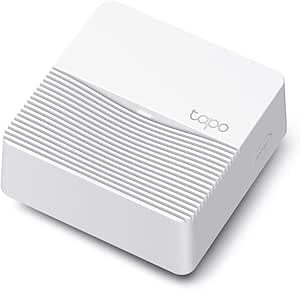 | Best Budget Starter Hub | Maximum Connected Devices: 64 switches, sensors, or buttons + 4 cameras or doorbells | Wireless Protocol: Ultra-low power wireless | Wi-Fi: 2.4GHz | VIEW LATEST PRICE | See Our Full Breakdown |
| Home Assistant Green Smart Home Hub with Advanced Automation |  | Best for Privacy-Minded Tinkerers | Processor: Quad-core | RAM: 4GB | Storage: 32GB | VIEW LATEST PRICE | See Our Full Breakdown |
| SmartThings Hub 3rd Generation |  | Best Ecosystem Breadth for the Price | Protocols: Zigbee, Z-Wave, Cloud-to-Cloud | Voice Assistant Compatibility: Alexa, Google Home | Automation Features: Device triggers, presence detection, remote control | VIEW LATEST PRICE | See Our Full Breakdown |
| Aqara Smart Home Hub M3 with Matter Controller, IR, Zigbee, Thread, Wi-Fi, PoE |  | Best Premium Multi-Protocol Hub | Protocols Supported: Zigbee, Thread, Wi-Fi, IR | Matter Support: Matter bridge and controller | Connectivity: Wired (PoE, USB-C) and wireless (2.4/5 GHz Wi-Fi) | VIEW LATEST PRICE | See Our Full Breakdown |
| Hubitat Elevation C-8 Pro Smart Home Hub – Z-Wave, Zigbee, Matter |  | Best for Speed and Reliability | Protocols Supported: Matter 1.5, Z-Wave 800 Series with Long Range, Zigbee 3.0, Bluetooth | External Antennas: 2 (Z-Wave and Zigbee) | Processing: Fully local automation engine | VIEW LATEST PRICE | See Our Full Breakdown |
| SONOFF Bridge Max Smart Home Hub (Bridge-M) |  | Best Budget Hub for Tinkerers | Compatibility: Zigbee, BTHome, eWeLink, Matter platforms | Voice Assistants: Alexa, Google Home, Apple Home | Local Control: Yes, via local web console | VIEW LATEST PRICE | See Our Full Breakdown |
| Homey Pro Mini | Smart Home Hub with Zigbee, Ethernet, Matter & Thread |  | Best Premium Pick | Protocols Supported: Zigbee, Matter, Thread | Connectivity: Ethernet | Compatibility: Apple Siri, Amazon Alexa, Google Home | VIEW LATEST PRICE | See Our Full Breakdown |
| YoLink Smart Home Hub, YS1603 |  | Best for Long-Range Sensor Networks | Connectivity: Proprietary LoRa-based wireless to YoLink devices | Ecosystem: YoLink app and devices | Device Type: Central smart home hub | VIEW LATEST PRICE | See Our Full Breakdown |
| TREATLIFE ZigBee 3.0 & Bluetooth Gateway, Smart Home Hub |  | Best Value for Beginners | Protocols: Zigbee 3.0 and Bluetooth | Compatibility: Smart Life, Tuya, TREATLIFE apps | Voice Assistants: Amazon Alexa, Google Assistant | VIEW LATEST PRICE | See Our Full Breakdown |
More Details on Our Top Picks
Tapo Smart Hub with Built-in Chime, H200, 2.4GHz Wi-Fi
For buyers who want a low-cost entry point into home automation, this option stands out because it bundles a hub, chime, and alarm into one inexpensive device. Compared with the Aqara Hub M3, the Tapo H200 covers far fewer protocols — there’s no Thread, Matter, or IR — but for sensor-heavy setups it does something the Aqara doesn’t: its ultra-low-power wireless protocol stretches sensor battery life considerably, which matters if you’re scattering dozens of door and motion sensors around the house. Support for 64 sensors plus 4 cameras is generous at this price, and microSD storage up to 512GB keeps video clips local rather than locked behind a subscription. The tradeoff is a closed Tapo ecosystem: if your devices aren’t on the compatibility list, this hub simply won’t talk to them.
Pros:- Extremely affordable entry into home automation
- 64-device capacity plus 4 cameras is generous for the price
- Low-power protocol dramatically extends sensor battery life
- Local microSD storage avoids subscription fees for recordings
Cons:- Locked to the Tapo ecosystem with no Zigbee, Z-Wave, or Thread support
- Requires a 2.4GHz Wi-Fi network, which can be a problem with modern mesh routers
- MicroSD card and some accessories sold separately
Best for: Budget-conscious homeowners building a Tapo-based sensor and camera security network
Not ideal for: Buyers with mixed-brand devices, since compatibility is limited to specific Tapo hardware
- Maximum Connected Devices:64 switches, sensors, or buttons + 4 cameras or doorbells
- Wireless Protocol:Ultra-low power wireless
- Wi-Fi:2.4GHz
- MicroSD Storage:Up to 512 GB (card sold separately)
- Chime Volume:Up to 90dB
- Voice Assistant Support:Alexa, Google Home
- Device Compatibility:Tapo C420, C400, D230, and other select Tapo devices
Our verdict“A great first hub if you’re committed to Tapo sensors and want security basics on a budget — just don’t expect cross-brand flexibility.”
Home Assistant Green Smart Home Hub with Advanced Automation
This model makes the most sense for buyers whose priority is keeping data local and owning their automation platform outright. Unlike the SmartThings Hub, which leans on Samsung’s cloud for many functions, Home Assistant Green ships with the open-source platform pre-installed, so your automations keep running even when your internet doesn’t. Compared with the Hubitat Elevation C-8 Pro, setup is friendlier out of the box, but there’s a catch: radios aren’t built in. You’ll need USB sticks to add Zigbee, Z-Wave, or Thread, which pushes the real cost above the sticker price. The fanless, few-watt design runs silently on a shelf, and 4GB of RAM handles complex automations without breaking a sweat. The 32GB of storage, however, will feel tight for anyone logging history or running add-ons long-term.
Pros:- Pre-installed Home Assistant with official Nabu Casa hardware support
- Fully local operation keeps smart home data private
- Silent, fanless design drawing only a few watts
- USB expandability lets you choose exactly which radios to add
Cons:- No built-in Zigbee, Z-Wave, or Thread radios — dongles cost extra
- 32GB of internal storage limits long-term logging and add-ons
- Wired Ethernet required for initial setup
Best for: DIY enthusiasts who want a self-hosted, private automation platform they fully control
Not ideal for: Plug-and-play buyers, since radios require separate USB dongles and initial setup needs Ethernet
- Processor:Quad-core
- RAM:4GB
- Storage:32GB
- Power Consumption:A few watts
- Cooling:Fanless passive design
- Radio Expandability:USB dongles for Zigbee, Z-Wave, and Thread
- Setup Requirement:Ethernet connection for initial setup
Our verdict“The right pick if you value local control and privacy enough to tinker — skip it if you want everything working in ten minutes.”
SmartThings Hub 3rd Generation
For buyers who want broad protocol coverage without a DIY learning curve, this pick stands out for supporting Zigbee, Z-Wave, and cloud-to-cloud integrations in one app — a wider native net than the Tapo H200 will ever cast. Presence detection and door-triggered automations work well once configured, and Alexa and Google Home compatibility come standard. That said, it sits in an awkward middle ground: compared with the Aqara Hub M3, it lacks Thread, IR, and Matter bridging; compared with the Home Assistant Green, its cloud dependence means automations can stall when Samsung’s servers hiccup. Setup is also less forgiving than modern hubs, and Samsung’s shift toward newer hardware and Matter standards makes this third-generation unit feel like a late-stage purchase rather than a future-proof one.
Pros:- Native Zigbee, Z-Wave, and cloud-to-cloud support covers a huge device catalog
- Mature app with reliable automation routines
- Works with Alexa and Google Home out of the box
- More affordable than premium multi-protocol hubs
Cons:- Cloud dependence means automations can fail during internet or server outages
- Setup can frustrate first-time users
- Older hardware without Matter or Thread support
Best for: Households with an existing mix of Zigbee and Z-Wave devices who want one app to rule them all
Not ideal for: Future-proofers — this aging generation lacks Matter and Thread support found in newer rivals
- Protocols:Zigbee, Z-Wave, Cloud-to-Cloud
- Voice Assistant Compatibility:Alexa, Google Home
- Automation Features:Device triggers, presence detection, remote control
- Control:Single SmartThings app
- Generation:3rd Generation
Our verdict“A sensible choice for consolidating a mixed Zigbee/Z-Wave household today, but buyers planning for the next five years should look at Matter-ready rivals.”
Aqara Smart Home Hub M3 with Matter Controller, IR, Zigbee, Thread, Wi-Fi, PoE
For buyers who refuse to choose between ecosystems, this option stands out as the most protocol-fluent hub in this lineup. Where the SmartThings Hub stops at Zigbee and Z-Wave, the M3 adds Thread, IR blaster control for legacy TVs and AC units, and full Matter bridging that pulls in HomeKit, Alexa, SmartThings, and Home Assistant simultaneously. Capacity is serious — 127 Zigbee plus 127 Thread devices — dwarfing the Tapo H200’s limits. The PoE and USB-C power options also allow placement anywhere, including wall mounting, which matters for IR line-of-sight. The tradeoffs are real though: no power adapter ships in the box, some features still phone home to the cloud, and IR exposure to Matter is limited to a single device. It’s the most capable pick here, but also demands the most from your wallet and setup patience.
Pros:- Four protocols (Zigbee, Thread, Wi-Fi, IR) plus Matter bridging in a single hub
- 254-device total capacity across Zigbee and Thread
- 8GB encrypted local storage for offline automations
- Flexible PoE or USB-C power with wall-mount placement
Cons:- Power adapter not included, adding hidden cost
- Some features still depend on Aqara’s cloud and internet
- IR control limited to one device exposed through Matter
Best for: Power users running mixed ecosystems who want Matter bridging, IR control, and huge device capacity in one box
Not ideal for: Casual users on a budget — the price plus a missing power adapter makes this overkill for a handful of devices
- Protocols Supported:Zigbee, Thread, Wi-Fi, IR
- Matter Support:Matter bridge and controller
- Connectivity:Wired (PoE, USB-C) and wireless (2.4/5 GHz Wi-Fi)
- Compatibility:Apple HomeKit, Alexa, SmartThings, Home Assistant
- Device Capacity:127 Zigbee devices, 127 Thread devices
- Local Storage:8GB encrypted
- Power:PoE or USB-C (adapter not included)
Our verdict“If you want one hub to unify Apple, Google, Amazon, and Home Assistant devices today and into the Matter era, this is the one to pay up for.”
Hubitat Elevation C-8 Pro Smart Home Hub – Z-Wave, Zigbee, Matter
Where this model separates itself is raw responsiveness. Because every automation runs locally on the hub itself, lights and locks react instantly — and keep reacting during internet outages — something the SmartThings Hub can’t guarantee with its cloud reliance. The Z-Wave 800 Series radio with Long Range and external Zigbee/Z-Wave antennas give it reach that compact hubs like the Tapo H200 simply can’t match in larger homes. No subscription and a genuinely active community extend its value over time, and Matter 1.5 support keeps it current. The honest tradeoff: this is an enthusiast’s tool. Compared with the Home Assistant Green, it’s more appliance-like and less flexible, but the interface still assumes you’re comfortable with rule builders and device drivers. Buyers who want app-driven simplicity will bounce off it; buyers who want their automation to never miss will love it.
Pros:- Local processing delivers millisecond-fast automations that survive internet outages
- Z-Wave 800 Long Range plus external antennas cover large homes
- No subscription required, with continuous free updates
- Active community support and broad protocol coverage (Z-Wave, Zigbee, Matter 1.5)
Cons:- Rule-builder setup intimidates first-time users despite documentation
- Not every smart device is supported, so check compatibility lists first
- Voice control requires linking external voice assistants
Best for: Automation enthusiasts in larger homes who prioritize instant, internet-independent local control
Not ideal for: Beginners who want a friendly app experience — the rule-based interface has a real learning curve
- Protocols Supported:Matter 1.5, Z-Wave 800 Series with Long Range, Zigbee 3.0, Bluetooth
- External Antennas:2 (Z-Wave and Zigbee)
- Processing:Fully local automation engine
- Subscription:None required
- Dimensions:3.23 x 2.95 x 0.67 inches
- Weight:0.16 lbs
Our verdict“The fastest, most outage-proof hub here for hands-on users in bigger houses — overkill for anyone with three smart bulbs and no patience for configuration.”
SONOFF Bridge Max Smart Home Hub (Bridge-M)
For buyers who want local-first control without a premium price, the SONOFF Bridge Max carves out a niche the bigger names don’t. Its local web console means automations keep running even when your internet doesn’t — an approach that echoes Home Assistant Green, but with built-in Zigbee, BTHome, and eWeLink radios included rather than requiring add-ons. The 90 dB alarm and mobile notifications also give it a security angle most hubs in this roundup ignore entirely.
The catch is setup. Compared with the plug-and-play TREATLIFE gateway, this option expects you to roll up your sleeves — Home Assistant integration and MQTT are powerful but demand configuration, and documentation on third-party Zigbee device support is thinner than what Hubitat or Aqara offer. This pick makes the most sense for hobbyists who see that flexibility as a feature rather than a chore.
Pros:- Works with Matter, Zigbee, BTHome, and eWeLink across Alexa, Google Home, and Apple Home
- Local web console keeps device management private and functional without cloud dependence
- Built-in 90 dB alarm adds genuine security capability rare at this price
- LAN and MQTT support makes it a natural fit for Home Assistant setups
Cons:- Integration requires technical setup that will frustrate non-hobbyists
- Supported third-party Zigbee device list is underdocumented compared to Hubitat or Aqara
- No clear app-based control or firmware update path mentioned
Best for: DIY-minded users who already run or plan to run Home Assistant and want an affordable, cloud-optional hub
Not ideal for: Anyone wanting a polished app experience out of the box — setup is technical and app-based control details are sparse
- Compatibility:Zigbee, BTHome, eWeLink, Matter platforms
- Voice Assistants:Alexa, Google Home, Apple Home
- Local Control:Yes, via local web console
- Home Assistant Support:Yes
- Security:Built-in 90 dB alarm, mobile notifications
- Connectivity:LAN, MQTT
Our verdict“A low-cost, privacy-focused hub that rewards tinkerers with local control — skip it if you want a hands-off setup.”
Homey Pro Mini | Smart Home Hub with Zigbee, Ethernet, Matter & Thread
The Homey Pro Mini sits at the polished end of this lineup, pairing Zigbee, Thread, and Matter with a refined Flow-based automation builder and zero subscription fees. Compared with the SONOFF Bridge Max, it trades raw openness for usability — the app experience and routine-building are genuinely approachable, closer to what SmartThings users expect but with far stronger local control. Ethernet is a welcome inclusion too, giving it a reliability edge over Wi-Fi-only hubs like the TREATLIFE gateway.
The tradeoff is modular by design: Z-Wave, Bluetooth, and infrared all require the separately sold Homey Bridge, so a protocol-complete setup costs considerably more than a Hubitat Elevation C-8 Pro, which builds those radios in from day one. If you live in Thread and Zigbee, the base unit is superb; if your home leans on Z-Wave locks or IR-controlled AV gear, budget accordingly.
Pros:- Zigbee, Thread, and Matter support covers both legacy and newest-generation devices
- Local control and Homey Flow automation work without any monthly fees
- Ethernet connection adds stability that Wi-Fi-only hubs can’t match
- Works with Siri, Alexa, and Google Home simultaneously
Cons:- Z-Wave, Bluetooth, and infrared require the separately purchased Homey Bridge
- Total system cost climbs quickly once add-ons are factored in
- App interface and setup details are sparsely documented
Best for: Buyers who want a polished, subscription-free hub with strong local automation and primarily Zigbee/Thread/Matter devices
Not ideal for: Households with Z-Wave or infrared devices — required add-on modules push total cost well past competitors
- Protocols Supported:Zigbee, Matter, Thread
- Connectivity:Ethernet
- Compatibility:Apple Siri, Amazon Alexa, Google Home
- Local Control:Yes
- Automation:Homey Flow, customizable routines
- Backups:Local and cloud
- Optional Modules:Homey Bridge (sold separately) for Z-Wave, Bluetooth, Infrared
Our verdict“An excellent premium hub for Zigbee/Thread households — just price in the add-on modules before committing.”
YoLink Smart Home Hub, YS1603
The YoLink YS1603 isn’t trying to compete with the Homey Pro Mini or Aqara M3 on protocol breadth — it does one thing well: connecting YoLink’s long-range LoRa-based sensors with remarkably reliable wireless performance. Where the TREATLIFE hub is capped at 128 devices over standard Zigbee, this option’s real strength is reach and stability across larger properties, which is why it’s popular for water leak sensors, motion detectors, and door sensors spread across a whole home or even an outbuilding.
The flip side is ecosystem lock-in. Unlike Matter-native hubs, it’s built around YoLink’s own device family, so mixing in third-party Zigbee or Thread gear means buying another hub anyway. Manufacturer specifications are also thin, making pre-purchase research harder than with SmartThings or Hubitat. This model is better suited to buyers solving a specific sensor-coverage problem than anyone assembling a mixed-brand smart home.
Pros:- Exceptionally reliable long-range wireless connectivity for scattered sensors
- Very easy integration with the broader YoLink device ecosystem
- Centralized control keeps multi-sensor setups manageable
- Simple setup with no technical configuration needed
Cons:- Ecosystem is limited to compatible YoLink devices
- Detailed specifications are sparse, complicating comparison shopping
- No Matter, Thread, or Z-Wave support for broader device mixing
Best for: Homeowners deploying many wireless sensors across a large property who value range and reliability over protocol variety
Not ideal for: Buyers building a mixed-brand smart home — it’s locked to YoLink devices and won’t host third-party Zigbee or Z-Wave gear
- Connectivity:Proprietary LoRa-based wireless to YoLink devices
- Ecosystem:YoLink app and devices
- Device Type:Central smart home hub
- Primary Use:Sensors, leak detectors, motion and door/window devices
- Third-Party Protocol Support:Not supported
Our verdict“The right choice if you’re standardizing on YoLink sensors across a big property; the wrong one for a multi-brand setup.”
TREATLIFE ZigBee 3.0 & Bluetooth Gateway, Smart Home Hub
At its price point, the TREATLIFE gateway is the easiest on-ramp in this batch. Plug it in, connect over 2.4GHz Wi-Fi, and its automatic device discovery pulls in up to 128 Zigbee 3.0 and Bluetooth devices through the familiar Smart Life/Tuya app — a far gentler first experience than the configuration-heavy SONOFF Bridge Max. Voice control via Alexa and Google Assistant works out of the box, and the two-year warranty softens the risk of betting on a budget brand.
Where it falls short against the Homey Pro Mini or Hubitat Elevation is sophistication: there’s no local automation engine, no Thread or Matter support, and everything depends on a stable 2.4GHz Wi-Fi connection — if your router is 5GHz-only or flaky, this hub will frustrate you. Compared with the Aqara M3, its 128-device ceiling and cloud reliance make it clearly an entry-level pick rather than a long-term backbone.
Pros:- Plug-and-play setup with automatic device discovery gets beginners running in minutes
- 128-device capacity is generous for the price
- Handles both Zigbee 3.0 and Bluetooth devices for solid ecosystem coverage
- Works with Smart Life, Tuya, and TREATLIFE apps plus Alexa and Google Assistant
Cons:- 2.4GHz-only Wi-Fi support fails outright on 5GHz-only networks
- No local automation — a lost internet connection stops your routines
- Lacks Matter, Thread, and Z-Wave support found on pricier rivals
Best for: First-time smart home builders assembling sensors, switches, and locks on a budget within the Tuya ecosystem
Not ideal for: Power users or large homes — cloud dependence, no Matter/Thread, and a 128-device cap limit long-term growth
- Protocols:Zigbee 3.0 and Bluetooth
- Compatibility:Smart Life, Tuya, TREATLIFE apps
- Voice Assistants:Amazon Alexa, Google Assistant
- Device Support:Up to 128 devices
- WiFi:2.4GHz only
- Warranty:2 years
Our verdict“A genuinely affordable starter hub that’s perfect for a first Tuya-based setup, but plan to graduate to something local-first later.”

How We Picked
I ranked these smart home automation hubs against the criteria that actually shape long-term satisfaction: protocol coverage (Zigbee, Z-Wave, Thread, Matter, Wi-Fi), local versus cloud automation, device capacity, ease of setup, app quality, and price relative to what each hub can control. A hub that supports only one protocol limits your future device choices, so multi-protocol hubs scored higher unless their price justified the limitation. Cloud-dependent hubs were penalized for latency and reliability risk, because automations that fail during an internet outage are the most common complaint in this category.
Ranking also reflected who each hub serves. Power-user platforms like Home Assistant Green and Hubitat earned top spots for capability but were judged on their steeper learning curves, while plug-and-play options like the Tapo H200 and YoLink hub were evaluated as beginner or niche picks rather than flagship contenders. The final order balances raw capability against real-world usability, so the best hub here depends on your skill level and ecosystem commitments as much as on specs.
Factors to Consider When Choosing Smart Home Automation Hubs
Before picking a hub, it helps to understand the bigger forces at play in smart home automation hubs — protocol wars, cloud dependence, and ecosystem lock-in all shape whether you’ll be happy two years from now.Match the Hub to Your Protocols Before Anything Else
The most expensive mistake in this category is buying a hub that can’t talk to the devices you already own or plan to buy. Zigbee remains the most common protocol for budget sensors and bulbs, Z-Wave dominates in locks and heavy-duty switches, and Thread plus Matter are the protocols most new devices are adopting through 2026. A Zigbee-only hub like the TREATLIFE gateway costs little, but the moment you add a Z-Wave lock, you’re shopping for a second hub. Multi-protocol hubs cost more upfront yet avoid the fragmentation problem entirely. Check the specific devices on your shopping list before choosing — protocol compatibility matters more than any app feature or brand promise.
Local Control Is Worth Paying For
Hubs that process automations in the cloud introduce two problems buyers rarely think about until they hit them: latency and outage dependence. A cloud-dependent hub can take a full second to respond to a motion sensor, and if your internet goes down, every automation stops working — including security-critical ones like leak alerts. Locally controlled hubs like Hubitat and Home Assistant execute rules in milliseconds and keep running through outages. There’s also a privacy angle: local hubs don’t send your daily routine data to a manufacturer’s servers. If your automations involve security, doors, or anything time-sensitive, local processing should be a requirement, not a nice-to-have.
Understand Ecosystem Lock-In Before You Commit
Some hubs are open platforms; others are gateways into a closed family of devices. YoLink and TREATLIFE hubs fall into the second camp — inexpensive and dependable, but designed to steer you toward their own sensors and accessories forever. Open platforms like Home Assistant and Hubitat accept nearly any device but ask more of you during setup. The middle ground is Matter certification, which guarantees a baseline of cross-brand compatibility. The real question is how you expect your system to grow: a homeowner adding one or two devices a year can happily live inside a closed ecosystem, while someone planning a whole-house build will resent those walls within months.
Don’t Overpay for Automation Power You Won’t Use
Hub capabilities range from simple schedules to full visual programming with conditions, variables, and custom scripts. Paying for a Home Assistant setup when you only want lights to turn on at sunset is like buying a server to check email. Honest self-assessment about your tinkering tolerance saves real money. Beginners consistently overestimate how much time they’ll spend building automations, then abandon complex hubs for their phone’s default app. Conversely, serious automators often start cheap, get frustrated by a simple hub’s limits within a year, and end up buying twice. Match the platform’s complexity ceiling to your actual ambitions, not your imagined ones.
Device Limits and Network Reliability Matter at Scale
Cheap hubs often cap out at 30–50 connected devices, which sounds generous until a whole-home build hits that ceiling with sensors, bulbs, and locks combined. The TREATLIFE gateway’s 128-device limit looks impressive until you realize its single-band Wi-Fi connection becomes a bottleneck under load. Wired connectivity — Ethernet or Power over Ethernet, as found on the Aqara M3 and Homey Pro Mini — eliminates the wireless interference problems that plague 2.4GHz-only hubs in congested homes. If you plan more than 40 devices or live in a dense apartment building with crowded airwaves, a wired backhaul is one of the most underrated upgrades you can buy.
Factor In the Real Cost of Ownership
The sticker price is only part of the equation. Some platforms push subscription services for advanced features, some ecosystems require proprietary devices that cost more than generic equivalents, and open platforms trade money for your time during setup. A cheap hub inside an expensive device ecosystem can cost more over three years than a premium hub that accepts generic Zigbee sensors. Also check the manufacturer’s track record: hubs are long-lived products, and companies that abandon firmware support leave you with an expensive brick. Established platforms with active communities — Home Assistant, Hubitat, SmartThings — offer the safest long-term bets.
Frequently Asked Questions
Do I still need a hub if my devices support Matter and Wi-Fi?
Fewer devices need hubs than in past years, but Matter doesn’t eliminate them — it standardizes them. Battery-powered sensors still overwhelmingly use Zigbee, Z-Wave, or Thread because Wi-Fi drains their batteries too quickly, so a hub with a Thread border router or Zigbee radio remains necessary for sensors, buttons, and locks. Hubs also centralize automation logic so your rules run even when your phone is off or the internet is down. If your setup is only a handful of smart bulbs and plugs, you can skip a hub entirely. But once you add security sensors or want reliable, fast automations, a hub pays for itself in responsiveness alone.
Is Home Assistant Green too complicated for a beginner?
Home Assistant Green removes most of the traditional barriers — no operating system installation, no Raspberry Pi assembly, just plug it in and open a web interface. The initial setup is genuinely approachable now. The complexity shows up later: advanced automations use YAML or a rule builder with a real learning curve, and troubleshooting odd device behavior sometimes requires community forums. A beginner who enjoys tinkering will thrive; someone who wants everything to just work will find SmartThings or Tapo far less frustrating. My honest framing is that Home Assistant Green is beginner-friendly to set up but intermediate-level to master, so your tolerance for learning matters more than your current skill.
What happens to my automations if the internet goes down?
It depends entirely on whether your hub processes rules locally or in the cloud. Locally controlled hubs — Hubitat Elevation, Home Assistant Green, and Homey Pro Mini — keep executing every automation during an outage, including motion-triggered lights and sensor alerts. Cloud-dependent hubs like the Tapo H200, YoLink hub, and TREATLIFE gateway typically stop responding to automations, though direct device control on your local network sometimes still works. If your automations include anything security-related — door sensors, leak detectors, cameras — this difference is a genuine safety consideration, not just convenience. Buyers in areas with unreliable internet should treat local control as non-negotiable.
Can one hub control both Zigbee and Z-Wave devices?
Yes, but only a handful of hubs include both radios, and in this lineup the Hubitat Elevation C-8 Pro is the main one that does. Most hubs pick a side: Aqara and SmartThings lean Zigbee, YoLink uses its own proprietary LoRa-based protocol, and TREATLIFE is Zigbee-only. Z-Wave matters most if you have or want North American smart locks, heavy-duty switches, or devices from brands like Zooz and Inovelli. If you’re starting from scratch with no existing devices, Zigbee plus Thread coverage will serve most households well and opens a larger budget-device market. Only pay the premium for dual-radio hubs if you know you need Z-Wave.
Is it worth paying more for Thread and Power over Ethernet?
Thread support is one of the better future-proofing investments available right now, since every major device manufacturer is releasing Thread products and the protocol self-heals its network, making it more reliable than Zigbee at scale. The Aqara M3 and Homey Pro Mini both include Thread border routers, which will matter increasingly as you replace devices over the next few years. Power over Ethernet is a narrower benefit: it matters mainly for placement flexibility and reliability in homes with crowded Wi-Fi, letting you install a hub anywhere a cable runs without worrying about wireless interference. If your home has Ethernet wiring and a growing device count, both features justify the price gap. Renters or small-apartment setups with a dozen devices can safely skip them.
Conclusion
After comparing all nine hubs, the right choice comes down to what kind of smart home you’re building. For best overall, the Hubitat Elevation C-8 Pro earns the top spot with its rare Zigbee-plus-Z-Wave-plus-Matter coverage, near-instant local automations, and enough depth to grow with you for years. The best value pick is the Aqara Hub M3, which packs Matter, Thread, an IR blaster, and Power over Ethernet into a mid-priced package that undercuts far less capable competitors. For best premium, the Homey Pro Mini combines polished software with serious protocol support in a compact, wired design, while Home Assistant Green is the strongest option for power users who want total control and don’t mind a learning curve.
For beginners, the Tapo H200 is the easiest entry point — cheap, nearly effortless to set up, and ideal for a first apartment setup. For specific needs: choose the SmartThings Hub 3rd Gen if you’re already invested in Samsung’s ecosystem, the YoLink hub if long-range outdoor sensors for a large property are the goal, the SONOFF Bridge Max for converting a large collection of legacy RF and IR devices, and the TREATLIFE gateway if you just want an inexpensive bridge for a handful of Tuya-compatible Zigbee devices. Whatever you pick, match the hub to your protocols and your patience for setup — that single decision predicts long-term satisfaction better than any spec sheet.