

If your Instant Pot displays a Burn error, it can be frustrating and halt your cooking process. This common issue often results from food sticking to the bottom or improper sealing. Fortunately, with the right troubleshooting steps, you can resolve it quickly and safely, ensuring your meals are cooked perfectly without ongoing interruptions.
In this guide, you’ll find practical, step-by-step solutions to identify causes, fix the problem, and prevent future Burn errors. Follow these instructions carefully to keep your Instant Pot operating efficiently and safely.
Key Takeaways
| Main Cause | Food sticking or burning on the bottom |
| Key Fix | Ensure proper sealing and sufficient liquid |
| Prevention | Avoid overfilling and stir before cooking |
| Safety Tip | Always check the sealing ring and lid |
| When to Seek Help | Persistent errors despite troubleshooting |

Instant Pot 4QT RIO Mini 7-in-1 Multi-Cooker, Pressure Cooker, Slow cook, Sauté, Steam, Rice Maker, Yogurt, & Warmer, Black, 4 Quarts
- 7-in-1 Multi-Cooker Functions: Pressure, slow, sauté, steam, rice, yogurt, warm
- Compact and Space-Saving: Mini size with same cooking surface as 8-inch pan
- Ideal for Small Meals: 4-quart capacity for up to 4 servings
As an affiliate, we earn on qualifying purchases.
Identify the Cause of the Burn Error
- Check if there is food or liquid at the bottom of the inner pot that may be burning.
- Ensure the sealing ring is properly installed and not damaged or misaligned.
- Verify the lid is securely closed and the pressure release valve is set correctly.
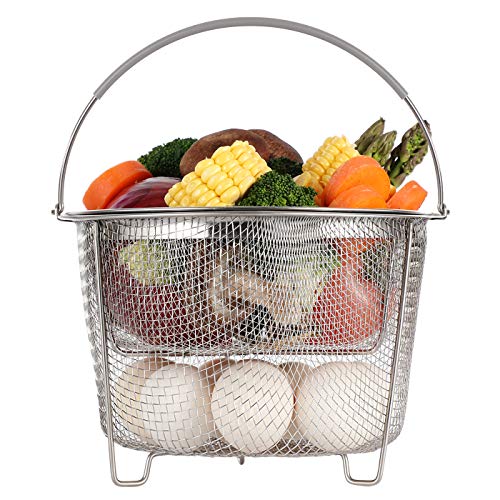
AOZITA Steamer Basket for Instant Pot Accessories 6 qt or 8 quart - 2 Tier Stackable 18/8 Stainless Steel Mesh - Silicone Handle - Vegetable Steamer Insert, Egg Basket, Pasta Strainer,Silver
- Two-Tier Stackable Design: Cook multiple foods simultaneously
- Versatile Instant Pot Accessory: Steams, strains, and cooks various foods
- High-Quality Stainless Steel: Durable, dishwasher safe material
As an affiliate, we earn on qualifying purchases.
Prepare for Troubleshooting
- Make sure the Instant Pot is unplugged before opening.
- Remove the inner pot carefully, and inspect the bottom for stuck food or residue.
- Clean the sealing ring and lid gasket thoroughly to remove any food debris or grease.
Fix the Burn Error
- Check the amount of liquid inside; ensure there is enough liquid (at least 1 cup for most recipes) to create steam and prevent burning.
- Stir the ingredients to loosen any stuck bits off the bottom of the pot.
- Reinstall the inner pot, ensuring it’s seated correctly and the sealing ring is in place.
- Close the lid properly, turn the steam release handle to sealing, and restart the cooking process.
Additional Tips to Prevent Burn Errors
- Avoid overfilling the pot—leave some space for expansion and steam.
- Use the sauté function to pre-cook or brown ingredients before pressure cooking.
- Stir ingredients well before sealing to distribute food evenly.
Safety Precautions
- Always unplug your Instant Pot before cleaning or inspecting parts.
- Ensure the sealing ring and lid are correctly positioned before cooking.
- Never force open the lid when the pot is under pressure.
The Products in This Guide

Instant Pot 4QT RIO Mini 7-in-1 Multi-Cooker
- ✔ Capacity: 4 Quarts
- ✔ Functions: 7-in-1
- ✔ Material: Stainless Steel & Plastic

AOZITA Steamer Basket
- ✔ Material: Stainless Steel
- ✔ Design: 2-tier stackable
- ✔ Handles: Silicone
Instant Pot 4QT RIO Mini 7-in-1 Multi-Cooker
The Instant Pot 4QT RIO Mini 7-in-1 Multi-Cooker is perfect for small households, offering versatile cooking options in a compact size. Its pressure cooking feature is reliable, but proper maintenance is key to avoiding Burn errors.
Pros:
- Space-saving design
- 7-in-1 functionality
- Easy to use controls
- Perfect for small servings
Cons:
- Limited capacity for large families
- Potential for Burn errors if not used properly
Best for: Singles, small families, and limited kitchen space
Not ideal for: Cooking for large groups or batch cooking
Bottom line: Ideal for small-scale cooking with versatile features, but requires attention to prevent Burn errors.
AOZITA Steamer Basket
The AOZITA Steamer Basket offers a practical way to cook vegetables, eggs, and more simultaneously. It helps prevent food from sticking to the bottom, reducing Burn errors.
Pros:
- Two-tier design
- Stainless steel mesh
- Easy to clean
- Fits 6 and 8-quart models
Cons:
- Adds to cleanup
- Requires extra space inside the pot
Best for: Steaming multiple foods efficiently
Not ideal for: For recipes requiring direct contact with the pot’s bottom
Bottom line: Great accessory for steaming, helping reduce burn errors by keeping food elevated.
Frequently Asked Questions
Why does my Instant Pot show a Burn error?
This usually happens due to food sticking or burning on the bottom, insufficient liquid, or improper sealing.
How can I prevent Burn errors in the future?
Ensure there is enough liquid, avoid overfilling, stir ingredients before sealing, and check the sealing ring and lid properly.
Is it safe to keep cooking after a Burn error?
It’s best to troubleshoot and fix the issue before restarting cooking to prevent damage or safety hazards.
Can I use a different sealing ring to prevent Burn errors?
Using a high-quality, properly installed sealing ring helps maintain a good seal, reducing the likelihood of errors.
Keep Your Instant Pot Cooking Smoothly
Burn errors in your Instant Pot are common but manageable with proper troubleshooting. Regular maintenance, correct sealing, and mindful cooking practices will keep your device functioning safely and efficiently. With these tips, you’ll enjoy stress-free pressure cooking every time.
Affiliate disclosure: As an Amazon Associate we earn from qualifying purchases. Prices and availability are accurate as of the time of publishing.