
TL;DR

Get home appliances delivered free with Prime
- Fast, free delivery on millions of items
- Prime Video, Amazon Music and more included
- Member-only deals all year
The Ambient reviewed the SwitchBot Lock Vision Pro, a $229.99 full deadbolt replacement that offers face, palm-vein and fingerprint unlocking alongside several other access methods. The reviewer found its biometrics and everyday performance strong, but noted a plastic-feeling exterior, a clunky app and limited Matter features; Aliro and UWB are absent.
The Ambient has reviewed SwitchBot’s Lock Vision Pro, a $229.99 smart deadbolt replacement with face, palm-vein and fingerprint recognition. The reviewer found its biometric unlocking capable and its performance reliable over several weeks, while pointing to trade-offs in hardware finish, app usability and smart-home integration.
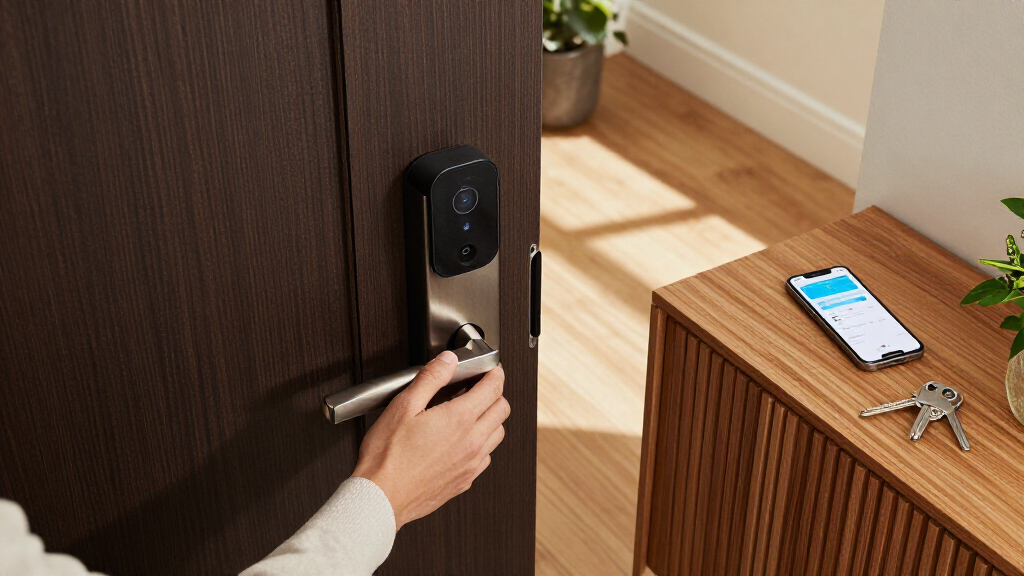
Unlike SwitchBot’s retrofit Lock Pro, the Vision Pro replaces a compatible deadbolt and includes exterior and interior hardware, a replacement deadbolt and physical keys. Its exterior unit combines a keypad and biometric sensors with a concealed keyway. The interior houses a thumbturn, the main battery compartment and a separate emergency battery. The outside hardware has an IP65 rating; the reviewer described it as chunky and predominantly plastic, while finding the interior structure’s zinc alloy more solid.
The lock supports up to 19 unlocking methods, including facial recognition, contactless palm-vein scanning, fingerprint reading, PIN codes, NFC, app and voice control, automatic unlocking and a physical key. SwitchBot says its facial system uses more than 20,000 infrared points to create a 3D face map and is designed to resist simple photo or video spoofing. The palm reader uses near-infrared technology to identify veins without requiring contact. Those technical descriptions are claims from SwitchBot; the review reports that the biometrics worked well in testing.
The review says installation was relatively straightforward when replacing a compatible deadbolt, with templates, app guidance and an installation video available. A door-frame sensor is needed for the lock to know whether the door is closed and to support automatic locking. The lock connects over Wi-Fi and supports Matter without a hub, but the reviewer characterized its Matter functions as basic. A rechargeable 10,000mAh battery and a backup battery are included, though the supplied material does not specify a tested battery life.
Multiple Ways Through One Door
The Vision Pro’s main appeal is access flexibility. A household can choose among biometrics, codes, NFC, a phone or a physical key, rather than depending on one method. That could be useful when residents have different preferences or when someone does not have a phone to hand. The supplied review identifies the palm-vein reader as a standout, and reports reliable performance during its testing period.
Those options come with trade-offs for buyers comparing smart locks. The reviewer says Matter support is limited and that the lock lacks Aliro and UWB, features associated with newer digital-key experiences on some competing products. The app also remains clunky, according to the review. At $229.99, the decision is not just whether the lock can open in several ways, but whether those access options outweigh the perceived hardware and ecosystem limitations.
Products Worth Considering

Philips Hue Bridge Pro Smart Lighting Hub

Samsung 42-Inch Class OLED S90F 4K Smart TV (2025)

Ring Battery Doorbell Plus (2nd Gen) and Indoor Cam Plus Bundle, Nickel Silver and White
As an affiliate, we earn on qualifying purchases.
A Deadbolt Replacement, Not Retrofit
The product’s form factor matters: the Lock Vision Pro is a full deadbolt replacement, not a device that attaches over an existing lock. Installation therefore depends on whether the door and current deadbolt are compatible, and involves fitting hardware on both sides of the door. The review says the necessary components are in the box and describes the process as relatively straightforward for a compatible replacement.
SwitchBot’s selling point here is combining several kinds of biometric access in one lock. The Pro model adds palm-vein and fingerprint recognition alongside facial recognition, with keypad, NFC, app and key access as alternatives. The Ambient’s assessment is based on several weeks of use, but the source material does not provide a long-term durability test or a comparison across a controlled group of competing locks.
“The palm-vein scanner is the highlight”
— The Ambient reviewer
Compatibility and Long-Term Use
The review does not establish how the lock performs over a longer period, how often its battery needs charging in typical use, or how well its biometric readers work across a broad range of users and conditions. SwitchBot’s claims about the facial system’s resistance to photo and video spoofing are described, but the source does not report independent security testing. Buyers will also need to check door and deadbolt compatibility before treating installation as straightforward.
The supplied material gives no detailed account of which Matter functions are supported, or how the lock behaves with specific smart-home platforms. It also does not explain the practical impact of missing Aliro and UWB for every user. Those points remain open beyond the reviewer’s broader assessment that Matter support is basic and the app is clunky.
Check Fit and Smart-Home Needs
The review does not announce a forthcoming software update, product change or additional testing milestone. For prospective buyers, the immediate next step is to confirm that the Lock Vision Pro fits the door and deadbolt setup, then check whether its available Matter features meet their smart-home needs. Households should also consider whether they prefer its multiple biometric options over a simpler lock or one with different digital-key support.
The Ambient’s published assessment is based on several weeks of use. Further information about long-term battery life, broader compatibility and any changes to the app or Matter support could alter how the lock compares with alternatives, but no such update is specified in the source material.
Key Questions
What is the SwitchBot Lock Vision Pro?
It is a smart deadbolt replacement with exterior and interior hardware. It is not designed to mount over an existing lock like SwitchBot’s Lock Pro retrofit model.
How can you unlock the Lock Vision Pro?
It supports up to 19 access methods, including face, palm-vein and fingerprint recognition, PIN codes, NFC, app and voice control, automatic unlocking and a physical key.
What did The Ambient like most?
The reviewer highlighted the palm-vein scanner, along with the range of biometric options and reliable performance during several weeks of use.
What are the main drawbacks in the review?
The reviewer said the exterior feels more plastic than expected for a $229.99 lock, and described the app as clunky and Matter support as basic. The lock also lacks Aliro and UWB.
Does it need a hub, and what should buyers check?
The review says it supports Matter over Wi-Fi without a hub. Buyers should still confirm door compatibility and check whether the available Matter features work for their intended smart-home setup.
Source: the-ambient.com