Keeping your Roborock Qrevo Curv in top condition ensures it continues to deliver effective cleaning. Proper maintenance involves regular cleaning of the brushes, mop pads, sensors, and dustbin. This guide provides clear, safe steps to clean your robot vacuum and troubleshoot common problems, helping you maintain its performance effortlessly.

Get home appliances delivered free — and shop member deals
- Fast, free delivery on millions of items
- Access to Prime Big Deal Days deals on October 6–7
- Prime Video, Amazon Music and more included
Key Takeaways
| Regular Cleaning Improves Performance | Clean brushes, filters, and sensors frequently to keep your robot operating efficiently. |
| Use Proper Tools and Safe Methods | Avoid harsh chemicals; use soft cloths and gentle brushes. |
| Self-Cleaning Dock Supports Maintenance | Leverages the dock’s self-cleaning features for easier upkeep. |
| Replace Consumables Periodically | Mop pads and filters need regular replacement for optimal cleaning. |
Gather Necessary Supplies
- Soft microfiber cloth
- Small brush or toothbrush
- Clean water or mild disinfectant
- Replacement mop pads (if needed)
Clean the Main Brush and Tangle-Free System
- Turn off and unplug the robot for safety.
- Remove the main brush by releasing the side latch.
- Use the small brush to remove hair, dust, and debris wrapped around the brush.
- Wipe the brush with a damp microfiber cloth.
- Check the anti-tangle system and clear any entangled hair or fibers.
Clean the Mop and Mop Pads
- Remove the mop pad from the robot.
- Wash the microfiber mop pad in warm water with a mild detergent.
- Allow it to air dry completely before reattaching.
- For self-cleaning, ensure the dock’s high-temperature cleaning cycle is functioning properly.
Empty and Clean the Dustbin
- Open the dustbin compartment and remove the bin.
- Empty the dust into a trash bin.
- Wipe the inside of the bin with a damp cloth.
- Reinstall the dustbin securely.
Clean Sensors and Charging Contacts
- Use a soft, dry cloth to gently wipe the sensors on the front and underside of the robot.
- Clean the charging contacts on both the robot and dock for proper charging.
The Products in This Guide
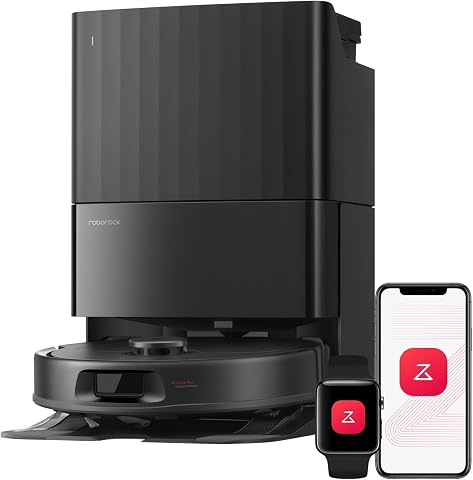
roborock Qrevo S Pro Robot Vacuum and Mop
- ✔ Weight: 10.5 lbs
- ✔ Battery Life: Up to 3 hours
- ✔ Charging Time: 4 hours

4 Pack Washable Filter
- ✔ Weight: Approx. 0.2 lbs each
- ✔ Dimensions: 3 x 2 inches
- ✔ Material: HEPA filter
roborock Qrevo S Pro Robot Vacuum and Mop
The Roborock Qrevo S Pro Robot Vacuum and Mop combines powerful suction with smart features, including self-cleaning and obstacle avoidance. Regular cleaning of this device ensures it functions at peak performance.
Pros:
- Powerful 18,500 Pa suction
- Self-cleaning dock reduces maintenance
- Smart obstacle avoidance
- Anti-tangle system for pet homes
Cons:
- Requires periodic filter and mop pad replacements
- Dock might be bulky in small spaces
- Self-cleaning cycle takes some time
Best for: Pet owners and busy households seeking effortless cleaning
Not ideal for: Homes requiring deep carpet cleaning or very high ceilings
Bottom line: The Roborock Qrevo S Pro offers powerful, smart cleaning with minimal user effort.
4 Pack Washable Filter
These washable filters are compatible with multiple Roborock models, including the Qrevo series. They help maintain high filtration efficiency and reduce ongoing costs.
Pros:
- Reusable and washable
- Compatible with many models
- True HEPA filtration quality
- Easy to install
Cons:
- Requires regular cleaning to maintain effectiveness
- Not OEM, but high quality
Best for: Pet owners and allergy sufferers
Not ideal for: Users preferring OEM-certified parts
Bottom line: A cost-effective way to keep your filtration system working efficiently.
Frequently Asked Questions
How often should I clean the brushes?
It’s recommended to clean the brushes weekly, especially if you have pets or a lot of debris.
Can I use regular water to wash the mop pads?
Yes, wash the microfiber mop pads in warm water with mild detergent. Avoid harsh chemicals.
What should I do if the robot stops charging?
Check and clean the charging contacts on both the robot and dock, then ensure the dock is plugged in properly.
Is self-cleaning necessary after every use?
While not mandatory daily, using the self-cleaning feature regularly helps maintain the mop and reduces manual cleaning.
Keep Your Roborock Qrevo Curv Performing at Its Best
Regular cleaning and maintenance of your Roborock Qrevo Curv ensure it continues to deliver optimal cleaning results. Following these simple steps helps extend the lifespan of your device and keeps your floors spotless with minimal effort. A little routine upkeep goes a long way in maintaining your robot’s efficiency and longevity.
Affiliate disclosure: As an Amazon Associate we earn from qualifying purchases. Prices and availability are accurate as of the time of publishing.
NFL season / tailgating Picks
team gear
As an affiliate, we earn on qualifying purchases.