This checklist is for homeowners and renters who want to think through everyday home security, from the front door to indoor alerts. It covers a mix of cameras, access controls, window sensors, and smoke and carbon monoxide detection.

Get home appliances delivered free with Prime
- Fast, free delivery on millions of items
- Prime Video, Amazon Music and more included
- Member-only deals all year
The sections are organized by where each device fits: entry points first, then outdoor and indoor monitoring, followed by window alerts and life-safety detection. Each slot includes a product pick and a short guide to the details worth checking before you buy.
Use the checklist to compare each pick with your home’s layout and setup. Confirm power, connectivity, mounting, and compatibility requirements in the product listing, then decide which gaps matter most for your household.
Video Doorbell
A video doorbell puts monitoring at a frequently used entry point, where visitors and deliveries arrive. Before choosing one, check how it receives power and whether that arrangement works with your existing doorbell wiring and the mounting location. The Ring Wired Doorbell Plus (2nd Gen), 2K Video, Nickel Silver is a wired pick, so confirm the installation requirements and available space around your door before ordering.
A common mistake is focusing on video resolution while overlooking installation and network fit. Check the product listing for the required wiring, Wi-Fi needs, app requirements, and any features that depend on a separate plan or service. Think through the view from the mounting position as well: a tight porch, nearby wall, or covered entry can affect what the camera can see. Make sure the finish and doorbell dimensions suit the entry, and verify that the unit can be installed where it will have a useful view without obstructing the door or walkway.
What to look for:
- Confirm existing wiring meets the product’s installation requirements.
- Check Wi-Fi coverage at the planned mounting location.
- Review app, account, and any service requirements.
- Measure the available space beside the door and verify mounting options.
- Consider whether the camera’s field of view suits the entry and approach.
Ring Wired Doorbell Plus (2nd Gen), 2K Video, Nickel Silver

This hardwired doorbell offers 2K video, up to 4x enhanced zoom, and adaptive night vision with color in low light. It includes motion alerts, video descriptions with a compatible subscription, and two-way talk; video quality may vary with internet bandwidth and device temperature.
Pros:
- 2K video with up to 4x enhanced zoom
- Adaptive night vision with color in low light
- Motion alerts and two-way talk
- Supports standard doorbell wiring
Cons:
- Video descriptions and cloud recordings require a compatible subscription
- Power adapter and hardwired transformer are not included
- Video quality may vary with bandwidth and device temperature
Best for: Households with compatible doorbell wiring and a suitable front-door mounting spot
Not ideal for: Homes that need a battery-powered or wiring-free installation
Bottom line: Choose this wired doorbell when its installation requirements and mounting position match your entry.
Outdoor Security Camera
Outdoor coverage helps you keep watch on approaches to the home, such as a driveway, yard, or side entrance. The Reolink 8-Channel 4K/8MP Security Camera System with 2TB HDD RLK8-800B is a multi-camera system with a recorder, so plan where each camera and the recording equipment will go before deciding it suits your property.
One frequent mistake is buying a system without checking cable routes, camera locations, and the recorder’s connection needs. Map the areas you want to cover and note the distance between those spots and the recording equipment. Confirm the listing’s power, wiring, installation, and network requirements, plus whether the recorder can be placed somewhere secure and accessible. Check that the included camera count and system configuration fit your layout, and leave room to adjust placement for sightlines around walls, eaves, and landscaping. Verify what storage and remote-viewing setup the system supports, and decide whether the installation is manageable for you or calls for professional help.
What to look for:
- Map the outdoor areas and entry points you want to monitor.
- Check the included camera count against your property layout.
- Confirm cable, power, and recorder placement requirements.
- Review storage, network, and remote-viewing requirements in the listing.
- Plan mounting positions for clear sightlines and practical installation.
Reolink 8-Channel 4K/8MP Security Camera System with 2TB HDD RLK8-800B6

This security camera system features 4K Ultra HD resolution, night vision up to 100 feet, and smart detection of persons, vehicles, and animals. It supports plug-and-play PoE connectivity, continuous 24/7 recording with a 2TB HDD, and is expandable up to 16TB.
Pros:
- High-resolution 4K Ultra HD video quality
- Effective night vision up to 100 feet
- Smart detection minimizes false alerts
- Reliable wired PoE connection for stable video feed
Cons:
- Requires Ethernet cabling for setup
- Monitor not included for local viewing
- Expandable storage up to 16TB may require additional setup
Best for: Homes with several outdoor areas to monitor and room for a recorder
Not ideal for: Renters or households unable to route cables or mount multiple cameras
Bottom line: Match the system’s camera placement and recorder requirements to your property before buying.
Indoor Security Camera
An indoor camera can add a view of a room where you want to check in remotely. The eufy Security 4K Indoor Camera E30, No Subscription, Pan and Tilt is the pick for this slot, and its pan-and-tilt design makes placement and room coverage especially important to consider.
A common buying mistake is placing a camera where furniture, windows, or bright light interfere with the view. Choose a stable location with access to power and dependable Wi-Fi, and check the product listing for app, account, and storage requirements. Consider whether pan and tilt can cover the room from your intended position, and whether the camera’s movement or field of view suits the household’s privacy preferences. Confirm how the device handles recordings and alerts, including any settings or storage choices you would need to configure. The product name states no subscription; still, review the listing to understand which features are available without one and what setup is required.
What to look for:
- Confirm the camera’s power and Wi-Fi requirements.
- Choose a stable position with a useful view of the intended room.
- Check app setup, recording options, and storage requirements.
- Review privacy settings and camera movement controls.
- Verify which features are included without a subscription.
eufy Security 4K Indoor Camera E30, No Subscription, Pan and Tilt

The eufy Security E30 is an indoor camera offering 4K ultra-clear recording, pan and tilt functionality, and AI-powered human and pet detection. It features color night vision, two-way audio, and local storage without subscription fees, compatible with popular smart home systems.
Pros:
- High-resolution 4K video with color night vision
- AI-powered human and pet detection with auto tracking
- No subscription fee for local storage and full features
- 360° panoramic view with easy app controls
Cons:
- Requires SD card for local storage (sold separately)
- Limited to indoor use
- Some advanced features may need subscription
Best for: Households that want an adjustable camera view in an indoor room
Not ideal for: Anyone who needs a camera that can operate without nearby power or Wi-Fi
Bottom line: Place it where power, Wi-Fi, privacy preferences, and room coverage all line up.
Smart Door Lock
A smart deadbolt changes how household members enter and secure a door, so fit and access preferences should guide the choice. The Schlage Encode Smart WiFi Deadbolt Lock with Century Trim, Matte Black pairs a specific trim style and finish with smart connectivity. Before buying, identify the door where it will go and check the lock’s fit requirements against that door.
Common mistakes include assuming every deadbolt opening is interchangeable and overlooking the door’s thickness, bore, backset, or existing hardware. Compare those measurements with the product listing and confirm the lock works with the door’s handing and condition. Check what connectivity, app, account, and power setup it requires, and think through how household members will receive and manage access. If the door has unusual trim, a narrow frame, or a storm door nearby, check clearance and installation details. Review the instructions for setup and any backup entry method, then make sure the matte black Century trim fits the look and available space at the intended door.
What to look for:
- Measure the door and compare all fit specifications with the listing.
- Confirm the deadbolt opening and existing hardware are compatible.
- Check Wi-Fi, app, account, and power requirements.
- Decide how household access will be managed and shared.
- Verify trim clearance and installation details for the target door.
Schlage Encode Smart WiFi Deadbolt Lock with Century Trim, Matte Black
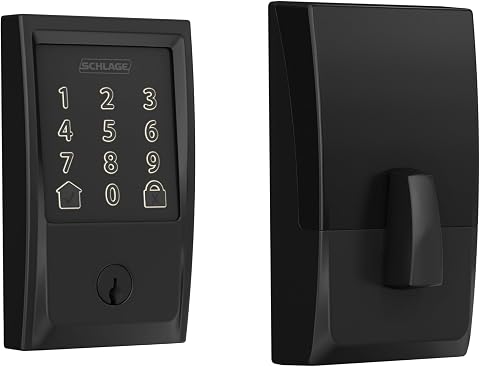
The Schlage Encode Smart WiFi Deadbolt offers keyless entry and remote control via a smartphone app, compatible with Alexa and Google Home for voice commands. It features advanced security, easy installation, and customizable access management, making it ideal for modern smart homes.
Pros:
- Remote access and control via smartphone app
- Compatible with voice assistants like Alexa and Google Home
- Easy to install without hardwiring
- High security with encryption and alarms
Cons:
- Battery life may require frequent replacement
- Limited to WiFi connectivity, no Z-Wave or Zigbee support
- Some users report occasional app connectivity issues
Best for: Households with a compatible deadbolt door that want smart access features
Not ideal for: Doors with nonstandard dimensions or limited hardware clearance
Bottom line: Verify the door measurements and setup requirements before replacing an existing deadbolt.
Window Alarm Sensor
Window alerts can help cover an entry point that a door lock or camera does not address. The listed pick is Wireless Alarm System for Home Security, 24Pcs WiFi+4G, No Monthly Fee. Since the product name describes a larger alarm system, first confirm what the package includes and whether its components cover the windows you have in mind.
A common mistake is treating a component count as a guarantee that every window is covered. Count the windows and other openings you want to monitor, then check the listing for the exact sensor types and quantities, installation method, and supported surfaces. Review how the system connects, what Wi-Fi and 4G setup entails, and whether the cellular connection requires activation or a compatible plan despite the product name’s no-monthly-fee wording. Confirm app, hub, power, and alert requirements, and decide where a hub or control unit could be placed. Check sensor dimensions and mounting clearances, especially for sliding or unusually framed windows, before committing to an installation plan.
What to look for:
- Confirm the exact sensor types and quantities in the package.
- Count target windows and match coverage to the included components.
- Review Wi-Fi, 4G, activation, hub, and app requirements.
- Check sensor dimensions and mounting method for each window type.
- Clarify any ongoing connectivity or service requirements in the listing.
Wireless Alarm System for Home Security, 24Pcs WiFi+4G, No Monthly Fees

This comprehensive home security system includes 24 sensors and supports dual WiFi and 4G networks to ensure continuous protection. It features a keypad, anti-tamper design, 48-hour battery backup, and remote control via app and voice assistants.
Pros:
- Supports dual WiFi and 4G networks for reliable connectivity
- Includes a large kit with 24 sensors for comprehensive coverage
- No monthly fees and free app control
- Features a 48-hour backup battery for power outages
Cons:
- Requires a SIM card for 4G connectivity (not included)
- Installation may require drilling and mounting hardware
- Some users may find setup process complex
Best for: Households seeking a multi-part alarm setup for several openings
Not ideal for: Anyone who only needs one or two standalone window sensors
Bottom line: Check package contents and connectivity terms against the openings you want to protect.
Smart Smoke Detector
Smoke and carbon monoxide alerts address life-safety needs that cameras and entry sensors do not. The X-Sense 6-Pack Interconnected Smoke and CO Detector, SC06-W is a multi-unit option, so start by counting the locations where detectors are needed and checking the product instructions for placement and installation requirements.
A common mistake is assuming that a pack size alone determines coverage. Follow applicable local requirements and the manufacturer’s placement guidance, and confirm whether the detectors are suitable for each intended location. Review how the units interconnect, how they are powered, and what the instructions say about testing, maintenance, and end-of-life replacement. Consider household needs such as hearing or mobility when planning alert placement and response. Verify the product’s compatibility and installation details before replacing existing detectors, and make sure everyone at home knows what to do when an alarm sounds. Smoke and CO detectors should be part of a broader safety plan, with regular checks following the manufacturer’s directions.
What to look for:
- Count required locations and follow local and manufacturer guidance.
- Confirm the unit is suitable for each planned placement.
- Check interconnection method and power requirements.
- Review testing, maintenance, and replacement instructions.
- Plan alert placement and household response to alarms.
X-Sense 6-Pack Interconnected Smoke and CO Detector, SC06-W

This set of six interconnected smoke and carbon monoxide detectors features a 10-year sealed lithium battery, ensuring maintenance-free operation. Easy to install without rewiring, they provide reliable safety with UL 217 and UL 2034 certification, and alert all units simultaneously when one detects danger.
Pros:
- Interconnected alarms for comprehensive safety coverage
- Long-lasting 10-year sealed battery eliminates need for replacements
- Easy to install without rewiring or additional wiring
- Certified to meet UL safety standards
Cons:
- Does not support Wi-Fi or base station connection
- Requires manual testing and silencing via button
- Limited to wireless interconnection, no network connectivity
Best for: Households that need several interconnected smoke and CO detectors
Not ideal for: Anyone who needs a single replacement unit or a different detector type
Bottom line: Plan detector placement first, then confirm the pack and installation guidance fit your home.
When buying in stages, start with life-safety coverage and entry points: address smoke and carbon monoxide detection, then secure the doors and windows you rely on most. Add outdoor cameras for the areas that matter to your layout, and consider indoor monitoring where it fills a specific gap. Check fit, power, network, and service requirements before each purchase so the devices work with your home.
A useful checklist is one that reflects your household’s actual needs, not the number of devices on a box. Measure first, read setup details, and build coverage one area at a time. With a little planning, you can choose a practical combination of alerts, access controls, and cameras that feels manageable to install and use.
Halloween Picks
halloween
As an affiliate, we earn on qualifying purchases.