
Finding the right label printer for home organization can be challenging, as options vary widely in features, price, and usability. The Brother P-Touch PT-D410 stands out as the overall best choice thanks to its reliability and versatile tape options. For those seeking portability, the DYMO LabelManager 280 offers a compact, rechargeable design, while the Phomemo D30 provides a budget-friendly, Bluetooth-enabled option perfect for quick labels around the house. However, tradeoffs often include size, connectivity, and tape compatibility. Continue reading for a detailed breakdown of each option and to find the best fit for your home organization needs.

Get home appliances delivered free with Prime
- Fast, free delivery on millions of items
- Prime Video, Amazon Music and more included
- Member-only deals all year
Complete the kit



Key Takeaways
- The most versatile label printer offers a balance of durability, tape options, and ease of use, making it ideal for varied home organization tasks.
- Connectivity features like Bluetooth or app support significantly enhance usability, especially for quick, on-the-go labeling.
- Budget models are suitable for light, occasional use but may lack durability or advanced features found in premium options.
- Size and portability matter if you plan to move the label maker around or store it easily when not in use.
- Battery life and power options are critical for convenience, especially if you prefer cordless devices.
| Brother P-Touch PT-D410 Home / Office Advanced Label Maker |  | Best Overall for Versatile Home and Office Labeling | Connectivity: USB | Label Tape Width: up to 3/4 inch (18mm) | Fonts: 15 | VIEW ON AMAZON | See Our Full Breakdown |
| Phomemo D30 Bluetooth Mini Label Maker with Tape |  | Best for On-the-Go Wireless Labeling | Connectivity: Bluetooth | Print Technology: Thermal | Power: Rechargeable battery | VIEW ON AMAZON | See Our Full Breakdown |
| DYMO LabelManager 280 Rechargeable Portable Label Maker |  | Best for Quick, Professional Labels on the Go | Power: Rechargeable battery | Connectivity: PC and Mac | Keyboard: QWERTY | VIEW ON AMAZON | See Our Full Breakdown |
| Brother PT-M95 P-Touch Monochrome Label Maker Bundle (4 Label Tapes Included) |  | Best Value for Basic Home & Office Labeling | Type: Monochrome Label Maker | Included Tapes: 4 | Tape Widths: 9mm (~3/8 inch), 12mm (~½ inch) | VIEW ON AMAZON | See Our Full Breakdown |
| SUPVAN T50M Pro Bluetooth Label Maker Machine with Tape, Waterproof, App-Enabled, Inkless, for Home & Office |  | Best Waterproof and Durable Labels for Versatile Use | Printer Type: Thermal | Waterproof: Yes | Enhanced Image Quality: Yes | VIEW ON AMAZON | See Our Full Breakdown |
| Nelko P21 Bluetooth Label Maker with Tape, Wireless Mini Printer for School, Office, Home |  | Best Overall for Portable, Customizable Labeling | Technology: BPA-Free Direct Thermal | Resolution: 203 DPI | Connectivity: Bluetooth | VIEW ON AMAZON | See Our Full Breakdown |
| Brother P-Touch PT-N20 Personal Desktop Label Maker, Portable, Handheld with Colorful Tapes |  | Best for Creative, Colorful Labels in Small Spaces | Tape Width: ½” (12mm) | Tape Length: 13.1’ (4m) | Fonts: 3 pre-loaded fonts | VIEW ON AMAZON | See Our Full Breakdown |
| Brother P-Touch PTD220 Home/Office Label Maker |  | Best for Durable, Laminated Labels in Home & Office | Power: 6 AAA batteries or optional AC adapter | Label Width: up to ½ inch (12mm) | Fonts: 14 | VIEW ON AMAZON | See Our Full Breakdown |
| DYMO LetraTag 100H Silver Handheld Label Maker & LT Label Tapes | 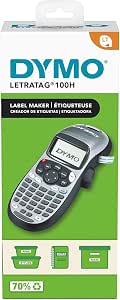 | Best Budget Handheld Label Maker for Basic Home Use | Print Technology: Thermal Printing | Font Sizes: 5 | Print Styles: 7 | VIEW ON AMAZON | See Our Full Breakdown |
| Brother P-Touch PT-D210 Label Maker Bundle (4 Tapes Included) |  | Best for Versatile, Multi-Format Labeling | Compatible Tape Widths: 3.5mm, 6mm, 9mm, 12mm | Power Options: 6 AAA batteries (sold separately), optional AC adapter | Included Tapes: 1 sample, 3 full-length | VIEW ON AMAZON | See Our Full Breakdown |
| DYMO LabelManager 160 Label Maker Bundle with 3 D1 Label Cassettes, Portable Handheld, QWERTY Keyboard, One-Touch Smart Keys, Large Display |  | Best for Portability and Basic Home Use | Printer Type: Thermal | Special Features: Compact, Portable, Lightweight, Display Screen, Auto Power Off, Inkless Printing | Print Output Type: Monochrome | VIEW ON AMAZON | See Our Full Breakdown |
| DYMO Desktop Label Maker | LabelManager 210D All-Purpose Portable Label Maker |  | Best for Desktop Use with Versatile Formatting | Display: Large semi-graphical | Keyboard: QWERTY | Label Widths: 1/4″, 3/8″, 1/2″ | VIEW ON AMAZON | See Our Full Breakdown |
| SUPVAN E11 Bluetooth Label Maker Machine with 4 Tapes, Support Keyboard & App, 30+ Fonts, 660+ Icons, Rechargeable Inkless Labeler |  | Best for Tech-Savvy Users and Customization | Printer Type: Thermal | Output Type: Monochrome | Resolution: 203 dpi | VIEW ON AMAZON | See Our Full Breakdown |
| NIIMBOT P21 Bluetooth Label Maker with Tape, Wireless Mini Printer for School, Office, Home |  | Best for Wireless Convenience and Mess-Free Printing | Connectivity: Bluetooth, USB | Compatible Devices: iOS, Android | Power: Rechargeable | VIEW ON AMAZON | See Our Full Breakdown |
| DYMO LabelManager 160 Portable Label Maker |  | Best for On-the-Go Labeling with Authentic DYMO Labels | Type: Portable Label Maker | Keyboard: QWERTY | Display: Large | VIEW ON AMAZON | See Our Full Breakdown |
More Details on Our Top Picks
Brother P-Touch PT-D410 Home / Office Advanced Label Maker
This model stands out for its robust connectivity and broad customization options, making it the best choice for those who want flexibility in home or small office organization. Unlike the DYMO LabelManager 280, which is more portable but limited to smaller labels, the PT-D410 supports larger tapes up to 3/4 inch wide and offers multiple fonts and symbols, ideal for more decorative or clear labels. Its reliance on a PC or Mac for full design features could be a drawback for users seeking a fully standalone device. The absence of a built-in preview display means you need to finalize designs beforehand, but its durable TZe tapes ensure labels withstand frequent handling. Overall, this label maker balances versatility and durability for serious home and office users who prioritize detailed customization.
Pros:- Supports large, durable TZe tapes for long-lasting labels
- Multiple fonts, styles, and symbols for extensive customization
- USB connectivity simplifies design transfers from PC or Mac
- Ideal for detailed labeling in home and office environments
Cons:- Limited to 3/4 inch wide tape, which may restrict larger labeling needs
- No built-in display for previewing labels before printing
- Requires a computer for full design capabilities
Best for: Home owners and small office users who need customizable, durable labels with a wide variety of font and symbol options.
Not ideal for: Casual users seeking a portable, standalone device without the need for a computer, or those preferring color labels.
- Connectivity:USB
- Label Tape Width:up to 3/4 inch (18mm)
- Fonts:15
- Font Styles:13
- Symbols:700
- Label Lines:up to 5
Our verdict“A versatile, durable label maker best suited for users who want detailed customization and are comfortable using a PC or Mac for design work.”
Phomemo D30 Bluetooth Mini Label Maker with Tape
This pick excels in portability and wireless convenience, making it ideal for quick labeling tasks around the home, school, or small business. Compared to the DYMO LabelManager 280, which requires a PC or Mac for advanced editing, the Phomemo D30 relies on a dedicated app, providing a seamless mobile experience. Its thermal printing technology means no ink or toner, reducing ongoing costs but limiting labels to black text, unlike the DYMO that supports more color options with its tapes. The compact size and rechargeable battery enable use anywhere, though the thermal-only printing and app dependency may be a turnoff for those needing high-volume or color labels. This device is perfect for users who prioritize convenience and mobility over advanced features.
Pros:- Wireless Bluetooth connectivity for easy printing from mobile devices
- No ink or toner needed, lowering long-term costs
- Wide selection of templates, icons, and fonts via the app
- Small, lightweight, and rechargeable for on-the-go use
Cons:- Limited to black text, with color effects only through tapes
- No color printing capability
- Dependent on a compatible smartphone or tablet app
Best for: Individuals who need quick, portable labels for personal or small business use and prefer smartphone control.
Not ideal for: Users requiring color labels, high-volume printing, or a standalone device without app reliance.
- Connectivity:Bluetooth
- Print Technology:Thermal
- Power:Rechargeable battery
- Templates & Fonts:4000+ icons, 800+ borders, 600+ fonts
- Tape Compatibility:Colorful thermal label tapes
- Size:Compact, palm-sized
Our verdict“A highly portable, wireless label maker ideal for mobile users who want customization through a smartphone app.”
DYMO LabelManager 280 Rechargeable Portable Label Maker
The DYMO LabelManager 280 offers quick, straightforward labeling with a familiar keyboard and customizable features, making it ideal for users who want professional results in a portable format. Its rechargeable battery and QWERTY keyboard offer ease of use, especially compared to bulkier desktop models like the Brother PT-D410. Unlike the Phomemo D30, it doesn’t rely on an app or Bluetooth, favoring a more traditional approach. However, its limited label widths (1/4” to 1/2”) and reliance on DYMO tapes restrict larger or more colorful labels. This device suits those who need quick, on-demand labels with a professional look, especially in small offices or for personal projects.
Pros:- Portable and rechargeable for on-the-go labeling
- QWERTY keyboard with quick formatting keys
- Compatible with authentic DYMO labels for professional results
- Simple to operate without additional apps
Cons:- Limited to small label widths, restricting larger labels
- Requires authentic DYMO tapes for optimal performance
- Some users may find setup for PC/Mac connectivity complex
Best for: Professionals or hobbyists who want portable, quick-labeling with easy-to-use features and reliable DYMO tape compatibility.
Not ideal for: Users needing larger, colorful, or highly decorative labels, or those who prefer smartphone control.
- Power:Rechargeable battery
- Connectivity:PC and Mac
- Keyboard:QWERTY
- Label Widths:1/4”, 3/8”, 1/2”
- Symbols and Clip Art:200+
- Labels Compatibility:DYMO labels
Our verdict“An efficient, portable label maker perfect for quick, professional labels with a straightforward interface.”
Brother PT-M95 P-Touch Monochrome Label Maker Bundle (4 Label Tapes Included)
This bundle offers an easy, budget-friendly solution for basic labeling needs, especially suitable for users who want a simple device with multiple tapes included. Compared to the more advanced PT-D410, the PT-M95 is limited to monochrome labels and fewer formatting options, but it excels in portability and straightforward operation. Its simple display and basic features make it ideal for labeling files, folders, or kitchen jars without fuss, though it cannot produce colorful or multi-line labels. The inclusion of four tapes at a competitive price makes this a solid choice for those starting out or with light labeling needs. However, it’s not suited for users requiring detailed customization or color labels.
Pros:- Includes four tapes, providing good value
- Portable and easy to operate with a simple QWERTY keyboard
- Supports multiple label sizes and styles
- Affordable entry point for basic labeling
Cons:- Limited to monochrome labels, restricting creative options
- Basic display limits advanced formatting or preview
- Only prints one or two lines of text comfortably
Best for: Home users or small office workers who need straightforward, monochrome labels without complexity or extra cost.
Not ideal for: Those requiring colorful, multi-line, or decorative labels, or advanced formatting options.
- Type:Monochrome Label Maker
- Included Tapes:4
- Tape Widths:9mm (~3/8 inch), 12mm (~½ inch)
- Display:Easy-view
- Keyboard:QWERTY
- Label Style:Basic text and symbols
Our verdict“A practical, cost-effective label maker for simple, monochrome labeling tasks in home or small office settings.”
SUPVAN T50M Pro Bluetooth Label Maker Machine with Tape, Waterproof, App-Enabled, Inkless, for Home & Office
This device emphasizes durability and versatility, especially for labeling items exposed to moisture or outdoor conditions. Its waterproof, inkless thermal printing sets it apart from the Phomemo D30 and DYMO models, which are limited to monochrome and smaller labels. The SUPVAN T50M Pro’s support for app customization and multiple device compatibility makes it appealing for users who want flexible, durable labels that can be created directly from smartphones or tablets. However, its maximum label width of just over 2 inches and monochrome output can be limiting for users needing larger or color labels. The reliance on an app and smartphone for operation might be inconvenient for those preferring traditional devices. This pick works best for users prioritizing waterproof, long-lasting labels for outdoor or industrial environments.
Pros:- Waterproof, scratch-resistant, and inkless printing ensures durability
- Supports customizable fonts, icons, and images via app
- Compatible with various label sizes up to 1-5/8 inches wide
- Lightweight and portable for mobile use
Cons:- Limited to monochrome printing, no color options
- Maximum label width of 2 inches may restrict larger labeling needs
- Requires a smartphone or tablet for operation, not standalone
Best for: Home or office users needing waterproof, durable labels for outdoor or high-moisture environments, and who prefer app-based customization.
Not ideal for: Users needing color labels, larger labels over 2 inches wide, or those without smartphones or tablets for operation.
- Printer Type:Thermal
- Waterproof:Yes
- Enhanced Image Quality:Yes
- Weight:433 grams
- Dimensions:5.9″D x 2.6″W x 4.3″H
- Connectivity:USB Type C, App (Android/iOS)
Our verdict“A durable, waterproof label maker perfect for outdoor or industrial labeling where long-term resilience matters most.”
Nelko P21 Bluetooth Label Maker with Tape, Wireless Mini Printer for School, Office, Home
The Nelko P21 Bluetooth Label Maker excels as the most versatile portable option, thanks to its wireless connectivity and extensive customization options. It stands out against models like the DYMO LetraTag 100H by offering high-definition thermal printing without ink, making it ideal for quick, on-the-go labeling. However, its limited compatibility with Android 14 Google phones and the absence of continuous tape support can be limiting for tech-savvy users who need seamless integration and longer labels. Its compact design and rich template library make it perfect for students and home organizers who want a flexible, inkless device, but the need for an external charger and limited tape sizes are tradeoffs to consider.
Pros:- Compact and portable design perfect for on-the-go use
- High-quality thermal printing without ink or toner
- Extensive templates, icons, and customization options
Cons:- Not compatible with Google phones running Android 14
- Does not support continuous label tapes
Best for: Individuals needing portable, customizable labels for school, home, or office on the move
Not ideal for: Users seeking a device compatible with all Android phones or requiring continuous tape support
- Technology:BPA-Free Direct Thermal
- Resolution:203 DPI
- Connectivity:Bluetooth
- Battery:Built-in rechargeable
- Compatibility:iOS & Android (not with Android 14)
- Templates & Features:3600+ icons, 700+ borders, 5500+ materials, 750+ templates, 29 languages
- Label Size Options:14×40mm, 14×50mm, 14×75mm
Our verdict“This label maker suits mobile users who prioritize customization and inkless printing, but may not be ideal for those with newer Android devices or needing longer labels.”
Brother P-Touch PT-N20 Personal Desktop Label Maker, Portable, Handheld with Colorful Tapes
The Brother P-Touch PT-N20 is tailored for users who want fun, vibrant labels with minimal fuss. Its full QWERTY keyboard and built-in cutter make it a breeze to create colorful, personalized labels, standing out from the simpler DYMO LetraTag with its limited font options. However, it’s restricted to Brother’s specific tape cartridges, which can limit creative options and increase ongoing costs. This device is ideal for dorm rooms, craft spaces, or workshops where visual appeal matters, but its two-line limit and tape compatibility constraints make it less suitable for larger, more complex labeling projects.
Pros:- Full QWERTY keyboard for easy, fast typing
- Supports colorful, customizable labels with various fonts and symbols
- Built-in cutter for quick, clean labels
Cons:- Limited to Brother tape cartridges, which may restrict choices
- Supports only up to two lines of text, limiting label size
Best for: Home, school, or craft users who want colorful, customizable labels with easy operation
Not ideal for: Users needing large labels or working with various tape brands and sizes
- Tape Width:½” (12mm)
- Tape Length:13.1’ (4m)
- Fonts:3 pre-loaded fonts
- Font Styles:7 styles
- Frames:15
- Symbols:250
- Label Lines:up to 2
- Label Height:9mm
Our verdict“Ideal for creative users who want vibrant labels and quick operation, but less suited for extensive or multi-line labeling tasks.”
Brother P-Touch PTD220 Home/Office Label Maker
The Brother P-Touch PTD220 offers a balance of portability and durability, making it a great choice for labeling files, shelves, and household items. Its ability to print laminated, water- and fade-resistant labels up to ½ inch wide surpasses simpler handheld models like the DYMO LetraTag, especially for long-term organization. While it requires batteries or an optional AC adapter, its large library of fonts, styles, and over 600 symbols provide versatile labeling options. However, its limited width and lack of color printing mean it can’t match premium or color-capable models for aesthetic flexibility, and battery operation can be inconvenient for continuous use. Overall, this device is well-suited for users who prioritize durable labels and ease of use over advanced features.
Pros:- Prints durable, laminated, water- and fade-resistant labels
- Portable and easy to operate with a variety of fonts and symbols
- Built-in memory for quick reprints
Cons:- Requires batteries or separate AC adapter (sold separately)
- Limited to ½ inch label width
Best for: Home or office users wanting reliable, laminated labels for long-term storage and organization
Not ideal for: Users seeking color printing or labels wider than ½ inch for larger projects
- Power:6 AAA batteries or optional AC adapter
- Label Width:up to ½ inch (12mm)
- Fonts:14
- Font Styles:11
- Designer Frames:99
- Symbols:over 600
- Memory:up to 30 labels
Our verdict“This label maker is best for those needing tough, laminated labels for everyday organization but isn’t suited for colorful or wide labels.”
DYMO LetraTag 100H Silver Handheld Label Maker & LT Label Tapes
The DYMO LetraTag 100H is a straightforward, budget-friendly handheld that covers basic labeling needs. It’s lightweight and compact, making it easy to carry around, and provides enough customization with five font sizes and seven styles. Its simplicity makes it ideal for quick labels in home or small office settings, especially compared with more advanced models like the Brother PT-D210 that offer wider tape options and more features. Nonetheless, its limited label size and basic feature set mean it falls short for users wanting more complex or visually appealing labels. This device is perfect for those on a tight budget who only need simple, small labels occasionally.
Pros:- Lightweight and portable for quick, on-the-go labeling
- Multiple font sizes and styles for basic customization
- Preview function helps avoid printing mistakes
Cons:- Limited to ½ inch label size
- Includes only one label cassette, limiting flexibility
Best for: Budget-conscious users needing basic labels for household or small office organization
Not ideal for: Users who want larger, colorful, or more sophisticated labels
- Print Technology:Thermal Printing
- Font Sizes:5
- Print Styles:7
- Box Styles:8
- Label Size:1/2 inch
- Power Saving:Auto-off
Our verdict“This label maker offers simple, affordable labeling for casual home use but lacks the features for more complex or decorative labels.”
Brother P-Touch PT-D210 Label Maker Bundle (4 Tapes Included)
The Brother PT-D210 Bundle combines convenience and flexibility, supporting multiple tape widths from 3.5mm to 12mm, making it suitable for various labeling tasks. Its quick-press keys and preview screen streamline the process, and the included tapes give immediate value for home or office organization. Compared with smaller models like the DYMO LetraTag, the PT-D210 offers broader formatting options and larger labels, though it requires six AAA batteries or an AC adapter for power, which could be less convenient. It’s a strong choice for users who want a diverse toolkit for different labeling applications, but those seeking a compact, battery-only device might find it slightly bulkier.
Pros:- Supports multiple tape widths and numerous formatting options
- Includes 4 tapes, making it ready for immediate use
- Durable, water- and fade-resistant labels
Cons:- Requires six AAA batteries or an AC adapter (sold separately)
- Some users may find the device slightly bulkier for portability
Best for: Organizers managing a variety of items needing different label sizes and formats
Not ideal for: People looking for a small, simple device for occasional use with limited tape options
- Compatible Tape Widths:3.5mm, 6mm, 9mm, 12mm
- Power Options:6 AAA batteries (sold separately), optional AC adapter
- Included Tapes:1 sample, 3 full-length
- Display:Preview screen
- Fonts:14
- Styles:10
- Frames:98
- Symbols:Over 600
Our verdict“This versatile bundle is perfect for users who need multi-format, durable labels and are okay with slightly larger devices and extra power requirements.”
DYMO LabelManager 160 Label Maker Bundle with 3 D1 Label Cassettes, Portable Handheld, QWERTY Keyboard, One-Touch Smart Keys, Large Display
The DYMO LabelManager 160 stands out for its compact, lightweight design, ideal for quick labeling tasks around the home or on the go. Its handheld form factor and familiar QWERTY keyboard make it easier to use than bulkier desktop models like the DYMO LabelManager 210D. However, its monochrome print limit and maximum of 5 copies per job can slow down larger projects. Compared to larger units, it sacrifices advanced formatting features for portability. This makes it a great choice for users who need to label frequently but don’t require complex formatting or large-volume printing.
Pros:- Lightweight and portable for on-the-go use
- User-friendly with QWERTY keyboard and touch controls
- Includes three label cassettes for versatile labeling
Cons:- Limited to monochrome printing only
- Maximum of 5 copies per run may slow larger projects
Best for: Individuals who want a portable, easy-to-use label maker for simple home organization tasks.
Not ideal for: Users needing high-volume printing or color labels, as this device only prints in black and white and restricts batch size.
- Printer Type:Thermal
- Special Features:Compact, Portable, Lightweight, Display Screen, Auto Power Off, Inkless Printing
- Print Output Type:Monochrome
- Item Weight:1.3 Pounds
- Item Dimensions:2.5″D x 10″W x 10″H
- Compatible Cartridges:DYMO D1 label tapes
Our verdict“This device suits those seeking a compact, straightforward label maker for quick, simple tasks at home or while traveling.”
DYMO Desktop Label Maker | LabelManager 210D All-Purpose Portable Label Maker
The DYMO LabelManager 210D offers a step up in size and functionality, making it suitable for more detailed labeling projects at home or in small offices. Its large display and QWERTY keyboard facilitate precise editing, and it supports multiple label widths and symbols, unlike the more basic LabelManager 160. However, it requires batteries or an AC adapter (sold separately), and its smaller display can be less intuitive for detailed editing. Compared to portable models, this unit is better suited for steady, desktop-based work that benefits from a larger screen and more formatting options.
Pros:- Large semi-graphical display for easy preview
- Supports multiple label widths and symbols
- Prints up to 10 copies at once
Cons:- Requires batteries or an AC adapter (not included)
- Small display can hinder detailed editing
Best for: Home users or small office staff who need a versatile, desktop-oriented label maker with more formatting options.
Not ideal for: People who prefer a lightweight, portable device or have limited space, as it is designed primarily for desktop use and needs external power sources.
- Display:Large semi-graphical
- Keyboard:QWERTY
- Label Widths:1/4″, 3/8″, 1/2″
- Print Capacity:Up to 10 copies
- Memory:Nine-label
- Power:Six AA batteries or AC adapter
Our verdict“Ideal for those needing a versatile, desktop label maker with broader formatting capabilities for home or small office use.”
SUPVAN E11 Bluetooth Label Maker Machine with 4 Tapes, Support Keyboard & App, 30+ Fonts, 660+ Icons, Rechargeable Inkless Labeler
The SUPVAN E11 stands out for its hybrid approach, combining app-based and keyboard printing, making it ideal for users who enjoy customizing labels with a variety of fonts and icons. Its rechargeable battery and Bluetooth connectivity add convenience, especially for those who want to design labels on their smartphones before printing. Compared with simple handhelds like the LabelManager 160, this model offers far more creative options, although its small display and reliance on a Bluetooth connection may pose challenges for less tech-savvy users. It’s best suited for home organizers who want detailed customization without sacrificing portability.
Pros:- Supports both keyboard and app-based printing
- Extensive fonts, icons, and templates for customization
- Rechargeable and portable with Bluetooth connectivity
Cons:- Limited to monochrome printing
- Small display and app setup may be complicated for some
Best for: Home users comfortable with smartphone apps seeking highly customizable labels with multiple fonts and icons.
Not ideal for: Less tech-oriented users or those who prefer standalone devices, as setup and app reliance can be a barrier.
- Printer Type:Thermal
- Output Type:Monochrome
- Resolution:203 dpi
- Print Speed:40 pages per minute
- Power:Rechargeable
- Compatible Devices:Smartphones
Our verdict“This label maker appeals to tech-savvy users who desire extensive customization and flexibility in their home organization labels.”
NIIMBOT P21 Bluetooth Label Maker with Tape, Wireless Mini Printer for School, Office, Home
The NIIMBOT B1 offers an ultra-compact, inkless thermal printing solution perfect for quick, mess-free labels in various settings. Its Bluetooth connection to iOS and Android devices makes it easy to print labels directly from your phone, similar to the SUPVAN E11, but with a focus on simplicity and durability. However, it’s limited to thermal printing, which means color options and detailed formatting are unavailable. This model is excellent for users who value portability and straightforward, inkless printing but may fall short for those needing more design flexibility or color labels.
Pros:- Bluetooth connectivity for easy mobile printing
- Inkless, clean, and no-mess printing
- Compact, durable design suitable for various environments
Cons:- Limited to thermal, monochrome printing
- No compatibility with tablets like iPads
Best for: Busy individuals who want a portable, wireless label printer for quick organization tasks at home or on the go.
Not ideal for: Users requiring color labels or complex formatting, as it only prints in black and white and is limited to thermal labels.
- Connectivity:Bluetooth, USB
- Compatible Devices:iOS, Android
- Power:Rechargeable
- Included Labels:2 x 1.18″ white rolls
- Material:ABS plastic
Our verdict“Perfect for those who need a reliable, portable, ink-free label printer for simple labeling tasks on the move.”
DYMO LabelManager 160 Portable Label Maker
The DYMO LabelManager 160 offers a straightforward, portable option for quick labels, especially for those already familiar with DYMO cartridges. Its QWERTY keyboard and large display make typing and formatting simple, comparable to the LabelManager 210D but in a more compact form. However, it’s limited to specific label widths and styles, and it requires authentic DYMO labels for optimal performance. This model is ideal for users who want a reliable, no-fuss device that’s easy to carry and operate but don’t need extensive formatting options or color printing.
Pros:- Portable and lightweight for easy transport
- Simple to operate with familiar keyboard
- Supports multiple label sizes and symbols
Cons:- Requires authentic DYMO labels for best results
- Limited to specific label widths and styles
Best for: Individuals needing a portable, reliable label maker for basic home organization with a preference for authentic DYMO labels.
Not ideal for: Users seeking advanced formatting, color labels, or larger label widths, as this device is limited in those aspects.
- Type:Portable Label Maker
- Keyboard:QWERTY
- Display:Large
- Connectivity:USB
- Label Widths:1/4 inches, 3/8 inches, 1/2 inches
- Power:Battery operated with automatic switch off
Our verdict“This label maker is well-suited for users looking for a dependable, portable device for basic labeling needs with authentic DYMO tape compatibility.”

How We Picked
The selection process focused on performance, ease of use, build quality, tape compatibility, and overall value. I prioritized devices that are straightforward for home users, offering reliable printing, intuitive interfaces, and durable construction. Devices with additional features like Bluetooth connectivity or color options were favored for their versatility. Each product was evaluated on its ability to meet typical home organization needs, balancing affordability with functionality. The ranking reflects a combination of user-friendliness, durability, and value, ensuring options for a variety of budgets and use cases.Factors to Consider When Choosing Label Printer For Home Organization
Choosing the right label printer for your home involves understanding key factors that influence usability and longevity. Beyond just price, consider how the device will fit into your daily routines, what types of labels you need, and how much effort you’re willing to invest in setup and maintenance. A good label printer should simplify your organization, not complicate it. Here are some important factors to weigh before making a purchase.Connectivity and Ease of Use
Wireless options like Bluetooth or Wi-Fi significantly enhance convenience, allowing you to print labels directly from your smartphone or tablet. If you prefer a straightforward, no-fuss device, a manual or USB-powered model could be better. Consider how intuitive the interface is; touchscreen controls or smart app integration can reduce frustration, especially for beginners. Keep in mind that more advanced connectivity may come with a learning curve or higher price, so match it to your comfort level and needs.
Tape Compatibility and Durability
The types of tape supported and their durability are crucial for long-term organization. Waterproof, fade-resistant, and heatproof tapes are ideal for kitchen or garage labels, while standard tapes suffice for shelving or storage bins. Some printers have a limited range of tape widths or colors, so consider what suits your labeling projects. Investing in versatile tape options may cost more upfront but can save money and hassle later, especially if you plan to label diverse items.
Size and Portability
If you need a device that can move easily between rooms or store discreetly, size and weight matter. Compact, handheld models are perfect for quick labels and small jobs, whereas larger desktop units might offer more features but take up space. Think about where you’ll use the printer most often and whether portability or a stable workspace is more important. Remember, smaller models may have limited tape options or larger buttons, impacting ease of use.
Power Source and Battery Life
Some label printers rely solely on batteries, offering cordless convenience, while others require AC power or USB connections. Battery life varies, so consider how often you’ll be using the device away from outlets. Rechargeable batteries are more cost-effective long-term, but devices with quick-charge features or power-saving modes add to convenience. For frequent use around the house, a model with reliable power options can prevent interruptions.
Cost and Long-Term Value
While budget models are tempting, they may lack durability or advanced features that improve usability. Consider the total cost of ownership, including tapes and accessories, which can add up over time. Sometimes investing slightly more upfront yields a more reliable device with better support and longer lifespan. Evaluate your labeling needs—occasional labeling might justify a lower-cost model, but regular use benefits from a more durable, feature-rich printer.
Frequently Asked Questions
Can I use third-party tapes with these label printers?
Many label printers are compatible with third-party tapes, which can reduce costs and offer more color or material options. However, compatibility varies by model, and using non-branded tapes might void warranties or affect print quality. Always check the manufacturer’s recommendations before purchasing third-party supplies to ensure proper fit and performance.
Are Bluetooth-enabled label printers difficult to set up?
Most modern Bluetooth label printers offer straightforward setup processes, often guided by companion apps. While initial pairing might take a few minutes, daily use is typically seamless. For less tech-savvy users, models with simple interfaces or wired options can minimize setup frustrations, but Bluetooth devices generally add convenience once connected.
How durable are the labels printed at home for long-term storage?
The durability depends heavily on the tape material used. Waterproof, fade-resistant, and heatproof tapes are designed to withstand various environmental conditions, making them suitable for long-term storage in kitchens, garages, or outdoors. Investing in these specialized tapes ensures your labels remain legible and intact over time, especially in challenging conditions.
Is it worth paying extra for a portable label printer?
Portable label printers are ideal if you frequently move around your home or need labels in multiple areas. They eliminate the need for cables and are generally lightweight, making quick labeling more convenient. However, they may have limited tape sizes or fewer features compared to larger, stationary models. Consider your usage frequency and whether portability genuinely enhances your workflow before investing.
Do all label printers support color labels?
Most basic models print in monochrome, which is sufficient for many home organization tasks. Devices supporting color labels are often more expensive and may require specialized tapes or ink. If color coding is important for your system, look for models explicitly offering color label printing, but be aware of higher costs and setup complexity involved.
Conclusion
For most home users, the Brother P-Touch PT-D410 offers a reliable, versatile solution that balances ease of use with durability, making it the best overall choice. If you’re on a budget or need quick, simple labels, the Phomemo D30 is a compelling option. Those seeking a premium experience with advanced features might prefer the SUPVAN T50M or similar high-end models. Beginners or casual labelers should focus on simplicity and connectivity, while more experienced organizers may prioritize tape durability and customization options. Ultimately, your choice depends on your labeling needs and how much you’re willing to invest.