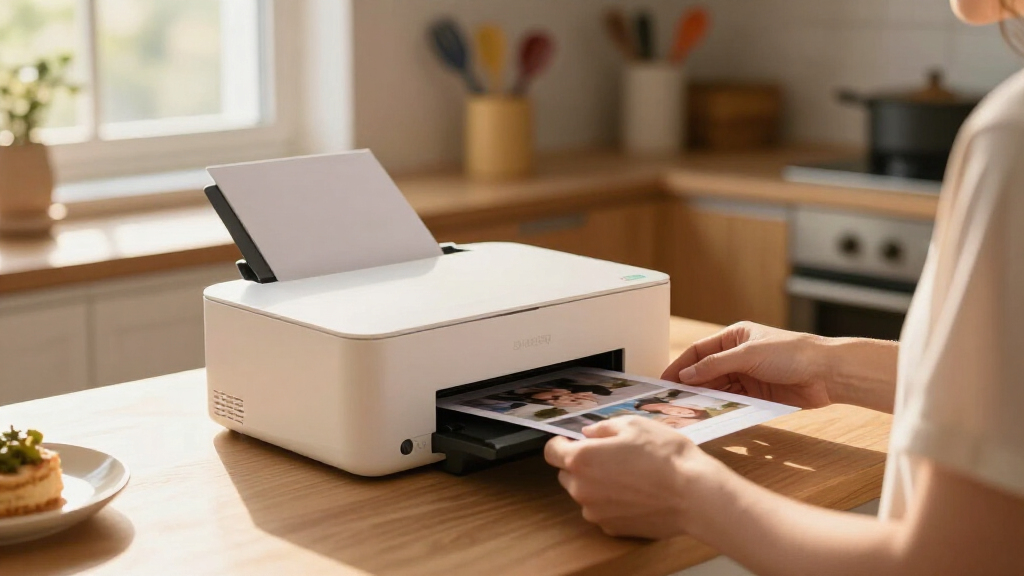

Compact desktop printers have to earn their spot on your desk by doing real work without hogging space, and that balance — small footprint versus genuine capability — is the tradeoff that defines this category. After comparing eight popular models, the Brother HL-L2460DW stands out as the best overall pick for its fast duplex laser printing and wired-free setup in a chassis small enough for any workspace. Two other options rise above the pack: the Brother MFC-J1360DW for buyers who need color, scanning, and copying in one compact unit, and the Canon PIXMA TR160 for anyone whose printing happens away from a desk entirely. The core tension you’ll face is inkjet versus laser — inkjets like the HP DeskJet line are cheaper upfront but cost more per page, while mono lasers cost more initially and reward you with speed and low running costs. Read on for the full breakdown, including who each model suits and who should skip it.

Get home appliances delivered free with Prime
- Fast, free delivery on millions of items
- Prime Video, Amazon Music and more included
- Member-only deals all year
Complete the kit



Key Takeaways
- Monochrome lasers (Brother HL-L2460DW, HL-L2405W, HP LaserJet M110w) beat every inkjet here on cost per page and print speed, but they’re useless for photos or color documents.
- The Brother HL-L2460DW earns the top spot over the cheaper HL-L2405W specifically because of automatic duplex printing — a small price gap that saves real time and paper over the printer’s life.
- The HP DeskJet 2855e and 2955 are nearly identical; the 2955 only makes sense if the price gap is under $20 at checkout, otherwise the 2855e is the same machine for less.
- The Canon PIXMA TR160 is the only truly portable option — battery-powered and bag-friendly — but its ink costs make it a poor choice as a primary home printer.
- All-in-one capability (the Brother MFC-J1360DW) adds scanning and copying without a meaningfully larger footprint, making single-function inkjets like the Canon TS6520 a harder sell unless print quality is the priority.
| Brother MFC-J1360DW Wireless Color Inkjet All-in-One Printer |  | Best Overall All-in-One | Print Speed: Up to 16 ppm black, 9 ppm color | Automatic Duplex Printing: Yes | Paper Capacity: 150 sheets | VIEW LATEST PRICE | See Our Full Breakdown |
| Brother HL-L2405W Wireless Monochrome Laser Printer |  | Best Value Laser | Print Speed: 30 pages per minute | Connectivity: Wireless (dual-band 2.4GHz/5GHz), USB | Paper Capacity: 250 sheets | VIEW LATEST PRICE | See Our Full Breakdown |
| HP DeskJet 2855e Wireless All-in-One Color Inkjet Printer | 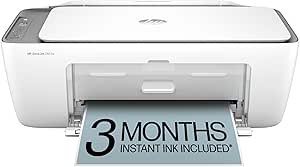 | Best for Beginners | Print Speed (Black): 7.5 ppm | Print Speed (Color): 5.5 ppm | Input Tray Capacity: 60 sheets | VIEW LATEST PRICE | See Our Full Breakdown |
| HP DeskJet 2955 Wireless All-in-One Color Inkjet Printer |  | Best Ultra-Budget Pick | Print Speed: Up to 7.5 ppm black, 5.5 ppm color | Input Tray Capacity: 60 sheets | Connectivity: Wireless, mobile printing | VIEW LATEST PRICE | See Our Full Breakdown |
| Brother HL-L2460DW Wireless Monochrome Laser Printer with Duplex |  | Best for Home Office Productivity | Print Speed: 36 pages per minute | Automatic Duplex Printing: Yes | Connectivity: Wi-Fi (dual-band), Ethernet, USB 2.0 | VIEW LATEST PRICE | See Our Full Breakdown |
| Canon PIXMA TR160 Color Wireless Portable Printer |  | Best for Travel | Printer Type: Portable inkjet | Output Type: Color | Item Weight: 4.5 pounds | VIEW LATEST PRICE | See Our Full Breakdown |
| Canon PIXMA TS6520 Wireless Color Inkjet Printer |  | Best All-in-One Value | Printer Type: All-in-one inkjet | Connectivity: Wi-Fi (dual-band 2.4GHz/5GHz) | Display: 1.42-inch monochrome OLED | VIEW LATEST PRICE | See Our Full Breakdown |
| HP LaserJet M110w Wireless Black & White Printer |  | Best for Fast Text Printing | Printer Type: Monochrome laser | Print Speed: Up to 21 pages per minute | Connectivity: Wireless, mobile printing | VIEW LATEST PRICE | See Our Full Breakdown |
| compact desktop printer | Connectivity | Print Speed |
|---|---|---|
| Brother MFC-J1360DW Wireless C | Wireless, USB | Up to 16 ppm black, 9 ppm color |
| Brother HL-L2405W Wireless Mon | Wireless (dual-band 2.4GHz/5GHz), USB | 30 pages per minute |
| HP DeskJet 2855e Wireless All- | — | — |
| HP DeskJet 2955 Wireless All-i | Wireless, mobile printing | Up to 7.5 ppm black, 5.5 ppm color |
| Brother HL-L2460DW Wireless Mo | Wi-Fi (dual-band), Ethernet, USB 2.0 | 36 pages per minute |
| Canon PIXMA TR160 Color Wirele | Wireless (app, AirPrint, cloud) | — |
| Canon PIXMA TS6520 Wireless Co | Wi-Fi (dual-band 2.4GHz/5GHz) | — |
| HP LaserJet M110w Wireless Bla | Wireless, mobile printing | Up to 21 pages per minute |
More Details on Our Top Picks
Brother MFC-J1360DW Wireless Color Inkjet All-in-One Printer
This model earns the top spot because it’s the only compact all-in-one here that bundles automatic duplex printing, a 20-sheet automatic document feeder, and color capability into one affordable footprint. Compared with the HP DeskJet 2855e, the paper capacity is more than double (150 sheets versus 60), which means far fewer mid-task refills if you print school packets or multi-page reports. The 1.8-inch color display is small but functional, and cloud app support makes scanning straight to services like Google Drive straightforward. The tradeoff is speed: at up to 16 ppm black and 9 ppm color, it trails both Brother lasers badly for long text jobs. Running costs on Brother’s ink series can also creep up over time, so high-volume photo printing is better left to a dedicated machine.
Pros:- Full all-in-one functionality with automatic duplex printing
- 20-sheet ADF plus 150-sheet tray beats the DeskJets on capacity
- Cloud and mobile printing support out of the box
- Compact footprint for the feature set
Cons:- Print speeds lag laser rivals considerably
- Ink costs accumulate with heavy use
- Small 1.8-inch display complicates menu navigation
Best for: Home offices and families who need print, scan, copy, and fax-style workflows with duplex in a compact body
Not ideal for: Anyone printing large black-and-white text volumes — the Brother HL-L2460DW does that faster and cheaper per page
- Print Speed:Up to 16 ppm black, 9 ppm color
- Automatic Duplex Printing:Yes
- Paper Capacity:150 sheets
- Automatic Document Feeder:20 sheets
- Display:1.8-inch color display
- Connectivity:Wireless, USB
Our verdict“The most balanced pick for mixed color and document work in a small space, as long as speed isn’t your priority.”
Brother HL-L2405W Wireless Monochrome Laser Printer
For pure text-and-documents value, this model makes the most sense. It prints at a genuinely quick 30 pages per minute, holds 250 sheets, and skips everything you don’t need — which is exactly why it costs less than its sibling, the Brother HL-L2460DW. The differences are real, though: no automatic duplex, no Ethernet, and a single-band-only feature set versus the 2460DW’s dual-band Wi-Fi. If you mostly print forms, invoices, and homework, manually flipping pages for double-sided jobs is a fair price for the savings. Compared with an inkjet like the HP DeskJet 2955, laser toner also resists drying out, so this is a smarter choice for occasional printers who go weeks between jobs. The toner subscription option helps running costs, but skipping duplex in 2024 still stings for paper-conscious buyers.
Pros:- Fast 30 ppm output for the price
- Large 250-sheet paper tray
- Dual-band Wi-Fi and mobile app support
- Laser toner won’t dry out between long gaps of use
Cons:- No automatic duplex printing
- Monochrome only — no color at all
- Toner cartridges sold separately and costly upfront
Best for: Budget-conscious students and remote workers who print mostly black-and-white documents
Not ideal for: Anyone needing color output or automatic two-sided printing — step up to the HL-L2460DW instead
- Print Speed:30 pages per minute
- Connectivity:Wireless (dual-band 2.4GHz/5GHz), USB
- Paper Capacity:250 sheets
- Supported Paper Types:Envelopes, specialty paper
- Duplex Printing:No
- Warranty:1 year
Our verdict“The cheapest way into fast, reliable laser printing, provided you can live without duplex and color.”
HP DeskJet 2855e Wireless All-in-One Color Inkjet Printer
This option stands out for setup simplicity: plug it in, connect to Wi-Fi through the HP app, and the included 3-month Instant Ink trial means you won’t run dry during the learning curve. It’s a better fit for first-time printer owners than the Brother MFC-J1360DW, which packs more features but more menus to learn. Print, scan, and copy all work through one mobile app, and the small footprint fits a dorm shelf or desk corner easily. The compromises are obvious once you push it: 60-sheet tray capacity, modest 7.5 ppm black speeds, and 2.4 GHz-only Wi-Fi that can struggle on congested networks. After the trial ends, ongoing ink delivery means a subscription decision — a real cost consideration the sticker price hides.
Pros:- Print, scan, and copy in one easy-to-manage device
- Guided app-based setup ideal for beginners
- 3-month Instant Ink trial included
- Compact size suits dorms and small desks
Cons:- 2.4 GHz Wi-Fi only, which can be less reliable on busy networks
- Modest print speeds unsuited to volume
- Ongoing ink costs depend on subscription enrollment
Best for: First-time printer owners, students, and light home users who want guided setup and ink that arrives automatically
Not ideal for: Households printing more than a few hundred pages monthly — slow speeds and a 60-sheet tray become frustrating fast
- Print Speed (Black):7.5 ppm
- Print Speed (Color):5.5 ppm
- Input Tray Capacity:60 sheets
- Wireless Capability:2.4 GHz only
- Functions:Print, scan, copy
- Includes:3-month Instant Ink trial
Our verdict“The easiest on-ramp to home printing for light users — just budget for the subscription after month three.”
HP DeskJet 2955 Wireless All-in-One Color Inkjet Printer
Positioned as the rock-bottom entry in this lineup, this model covers the basics — print, scan, copy, wireless — for less than almost anything else that does all three. Against its stablemate the HP DeskJet 2855e, the practical differences are thin: identical speeds and 60-sheet capacity, but the 2955 adds an intuitive LCD for standalone operation and an eco-conscious build with recycled plastics, backed by ENERGY STAR and EPEAT certification. Buyers should think of these as twins split by price and availability rather than capability. Like the 2855e, it leans on Instant Ink after the 3-month trial, and the same modest 7.5 ppm black speed applies. Compared with the Brother HL-L2405W, it trades speed for color — the right call only if occasional photos and color handouts matter more than fast text output.
Pros:- Very low upfront cost for full all-in-one functionality
- LCD screen simplifies standalone operation
- Recycled-plastic build with ENERGY STAR and EPEAT certification
- Wireless and mobile printing included
Cons:- Sluggish print speeds for anything beyond occasional use
- 60-sheet tray requires frequent refills
- Ink delivery depends on a paid subscription after trial
Best for: Buyers on the tightest budget who still want basic color, scanning, and copying at home
Not ideal for: Anyone who prints frequently — small tray, slow speeds, and subscription-dependent ink make it a light-duty machine only
- Print Speed:Up to 7.5 ppm black, 5.5 ppm color
- Input Tray Capacity:60 sheets
- Connectivity:Wireless, mobile printing
- Display:Intuitive LCD
- Included Trial:3 months of Instant Ink
- Energy Certification:ENERGY STAR, EPEAT
Our verdict“The cheapest credible all-in-one on the shelf — fine for occasional printing, limiting as your needs grow.”
Brother HL-L2460DW Wireless Monochrome Laser Printer with Duplex
This is the productivity ceiling of the compact picks. At 36 pages per minute with automatic duplex, it outpaces the cheaper Brother HL-L2405W on both counts, and adds Ethernet for offices where Wi-Fi isn’t dependable. That combination — speed plus two-sided printing plus a 250-sheet tray — is what separates a home-office workhorse from a convenience printer like the HP DeskJet 2855e, which would take several times longer for the same stack of documents. Duplex alone can halve paper consumption, a saving that compounds for anyone printing contracts or drafts regularly. The limitations are inherited from its category: no color, full stop, and the best toner pricing requires Brother’s subscription enrollment, which some buyers will dislike on principle. For black-and-white volume, though, nothing compact here competes.
Pros:- Fast 36 ppm output leads this lineup
- Automatic duplex printing cuts paper use in half
- Wi-Fi, Ethernet, and USB for flexible placement
- 250-sheet tray plus high-yield toner options for volume
Cons:- Monochrome only, no color capability
- Best toner pricing requires subscription enrollment
- Costs more than the duplex-free HL-L2405W
Best for: Home offices and small teams printing high volumes of black-and-white documents daily
Not ideal for: Households needing color or photo printing — a monochrome-only laser can’t cover those jobs at all
- Print Speed:36 pages per minute
- Automatic Duplex Printing:Yes
- Connectivity:Wi-Fi (dual-band), Ethernet, USB 2.0
- Paper Capacity:250 sheets
- Supported Toner:TN830, TN830XL, TN830XL 2PK
- Energy Star Certified:Yes
- EPEAT Rating:Silver
Our verdict“The pick for serious document throughput in a small footprint — buy it for speed and duplex, not versatility.”
Canon PIXMA TR160 Color Wireless Portable Printer
Not every compact printer is actually built to leave the desk, and that’s where the TR160 separates itself. At just 4.5 pounds and 2.6 inches tall when closed, it slides into a tote in a way no other printer in this lineup can — the Canon PIXMA TS6520 is compact for a desk, but nobody is carrying it to a client site. This model stands out for genuinely vibrant color output on both documents and glossy photo paper, plus flexible printing from phones, tablets, and cloud services via the Canon PRINT app and AirPrint. The tradeoffs are real: with copy speeds around 9 pages per minute, it lags far behind the HP LaserJet M110w at 21 ppm, and the two-cartridge ink system means cost per page adds up fast. It’s also print-only — no scanning or copying. Those compromises make sense only if portability is the actual priority.
Pros:- Truly portable at 4.5 pounds with a slim 2.6-inch profile
- Excellent color quality on documents and glossy photos
- Flexible wireless options including AirPrint, app, and cloud printing
- Bright OLED display makes status checks simple on the road
Cons:- Copy speed of roughly 9 ppm is slow for anything beyond occasional jobs
- No scanner or copier — it’s a print-only device
- Ink costs accumulate quickly with frequent travel printing
Best for: Remote workers, real estate agents, and event photographers who need quality color printing away from the office
Not ideal for: Home offices with steady document volume — it’s slow, print-only, and more expensive per page than desktop alternatives like the TS6520
- Printer Type:Portable inkjet
- Output Type:Color
- Item Weight:4.5 pounds
- Item Dimensions:12.7″D x 7.3″W x 2.6″H
- Connectivity:Wireless (app, AirPrint, cloud)
- Max Media Size:8.5″ x 11″
- Maximum Copy Speed:9 pages per minute
- Compatible Devices:PC, Smartphones, Tablets
Our verdict“Buy this only if printing needs to happen away from a desk; everyone else gets more capability for less money elsewhere in this roundup.”
Canon PIXMA TS6520 Wireless Color Inkjet Printer
For buyers who want scanning and copying without paying for features they’ll never touch, the TS6520 hits a sweet spot. Compared with the HP DeskJet 2855e, it adds automatic duplex printing and dual-band Wi-Fi, which means fewer paper-wasting manual flips and a more stable wireless connection in crowded home networks. Its compact footprint earns it a place in this roundup, though it’s worth being honest that it’s a desktop compact, not a travel compact — the Canon PIXMA TR160 wins on true portability. The two-cartridge hybrid ink system keeps the purchase price low but shifts costs to refills, so heavy printers will feel it in the wallet over time. The small monochrome OLED gets the job done but demands more menu navigation than a touchscreen would. As an affordable everyday all-in-one for mixed document and photo work, this pick makes the most sense for hybrid households.
Pros:- Prints, scans, and copies at a budget-friendly price
- Automatic duplex printing saves paper
- Dual-band Wi-Fi plus AirPrint and Mopria support
- Strong color output for photos and everyday documents
Cons:- Two-cartridge ink system gets costly with heavy use
- Small monochrome OLED makes navigation less intuitive
- No automatic document feeder for multi-page scanning
Best for: Budget-conscious households and hybrid workers who need print, scan, and copy in one affordable desktop unit
Not ideal for: High-volume text printers — laser options like the Brother HL-L2460DW deliver far lower cost per page
- Printer Type:All-in-one inkjet
- Connectivity:Wi-Fi (dual-band 2.4GHz/5GHz)
- Display:1.42-inch monochrome OLED
- Max Media Size:Up to 8.5″ x 11″
- Automatic Duplex Printing:Yes
- Mobile Printing:Canon PRINT App, AirPrint, Mopria
- Cartridge System:2-cartridge hybrid ink
Our verdict“A sensible pick for anyone who wants full all-in-one functionality and decent photo quality without a big upfront spend.”
HP LaserJet M110w Wireless Black & White Printer
When the job is crisp black-and-white documents, fast, this is the clear choice in this lineup. At up to 21 pages per minute, it roughly doubles the output speed of inkjets here like the Canon PIXMA TS6520, and laser text sharpness makes contracts and reports look more professional than any inkjet can manage. HP markets it as the smallest laser in its class, and that claim holds up — it earns its compact-desktop badge while still outpacing everything else in this batch. The compromises are structural: there’s no color, no scanner, no copier, so it can’t be a household’s only printer. Compared with the Brother HL-L2405W, it matches the monochrome-laser concept but leans on HP’s Smart app ecosystem — and it only accepts original HP cartridges, which locks buyers into pricier consumables. For a small team of one to three people churning out text, those tradeoffs are easy to accept.
Pros:- Fast 21 ppm output leads this roundup
- Genuinely compact footprint for a laser printer
- Broad compatibility including AirPrint, Chromebook, and Mac
- Laser-sharp text quality ideal for professional documents
Cons:- Black-and-white only, with no scanning or copying
- Locked to original HP cartridges, raising running costs
- No automatic duplex printing at this price
Best for: Small teams and solo professionals who print mostly black-and-white documents and value speed
Not ideal for: Households needing color photos or occasional scans — this is a single-purpose text machine
- Printer Type:Monochrome laser
- Print Speed:Up to 21 pages per minute
- Connectivity:Wireless, mobile printing
- Output Type:Black & white
- Compatibility:Microsoft, Mac, AirPrint, Android, Chromebook
- Size:Smallest laser in its class
- Recommended Users:Small teams of 1-3 people
Our verdict“The right pick if fast, sharp monochrome documents are the whole job — wrong pick for anyone who needs versatility.”
How We Picked
I evaluated each printer against the criteria that matter most when desk space is limited: physical footprint relative to capability, cost per page based on ink and toner pricing, print speed and quality for typical documents, ease of setup and connectivity (Wi-Fi, mobile printing, app support), and long-term reliability based on the brand’s track record in this segment. Models were ranked by how well they balance those factors rather than by spec sheets alone — a printer that’s tiny but expensive to run ranks lower than one slightly larger with cheap consumables.
The ranking logic is straightforward: value over the printer’s lifetime beats sticker price. That’s why the duplex-capable Brother HL-L2460DW outranks its nearly identical sibling, the HL-L2405W, and why cheap inkjet all-in-ones sit mid-pack despite their attractive upfront cost. Each product in this lineup fills a distinct role — primary home-office workhorse, budget starter machine, color-capable compact, or true portable — so the ordering reflects which roles deliver the best overall outcomes for the largest number of buyers.
| compact desktop printer | Connectivity |
|---|---|
| Brother MFC-J1360DW Wireless C | Wireless, USB |
| Brother HL-L2405W Wireless Mon | Wireless (dual-band 2.4GHz/5GHz), USB |
| HP DeskJet 2855e Wireless All- | — |
| HP DeskJet 2955 Wireless All-i | Wireless, mobile printing |
| Brother HL-L2460DW Wireless Mo | Wi-Fi (dual-band), Ethernet, USB 2.0 |
| Canon PIXMA TR160 Color Wirele | Wireless (app, AirPrint, cloud) |
| Canon PIXMA TS6520 Wireless Co | Wi-Fi (dual-band 2.4GHz/5GHz) |
| HP LaserJet M110w Wireless Bla | Wireless, mobile printing |
Factors to Consider When Choosing Compact Desktop Printers
Before clicking buy, it helps to understand the patterns I found across these eight models. The same mistakes come up repeatedly — chasing the lowest sticker price, overbuying features, or assuming any small printer will handle any job — and each one costs money or frustration later.Inkjet vs. Laser: The Decision That Drives Everything Else
The single biggest fork in the road is ink or toner, and it shapes cost, speed, and capability more than any other choice. Inkjets in this roundup — the HP DeskJets, the Canon PIXMA models, and the Brother MFC-J1360DW — handle color documents and photos, but their ink runs dry fast and costs mount quickly if you print often. Mono lasers like the three laser models here print faster, sharper text, and their toner cartridges last for thousands of pages, which is why a higher upfront price usually pays for itself within a year of moderate printing. A useful rule of thumb: if you print mostly text and documents more than a few times a week, laser wins on economics. If color or photos are non-negotiable, accept the inkjet running costs and budget for them consciously — or look at ink subscription programs, which soften the blow for low-volume users.
Footprint Isn’t Just Width and Depth
Manufacturer dimensions rarely tell the full story, because they exclude paper trays that extend outward and clearance needed for paper paths. A compact printer with a rear feed slot, like the Canon TS6520, may need several extra inches behind it when in use, effectively doubling its depth. Front-loading cassette designs — common on the Brother lasers — keep the working footprint constant. Measure your actual desk space with the printer fully loaded and in operation, not the shipping-box dimensions. Also check whether the model can sit on a shelf: lasers run warm and some inkjets need headroom for the scanning lid, so a unit that fits ‘on paper’ may not fit where you planned.
The Cheap-Printer Trap: Calculate Cost Per Page Before Buying
The most common mistake in this category is buying a $60 printer that costs $200 a year in ink. Entry-level inkjets are often sold near cost, with the profit made on cartridges that yield 100–150 pages. Divide cartridge price by page yield for every model you compare — the difference between models can be threefold or more. Lasers flip this equation: the HP LaserJet M110w and Brother HL series typically deliver text pages at a fraction of an inkjet’s cost. Also weigh whether a model supports high-yield or third-party cartridges, since that flexibility can halve running costs over the printer’s life. A slightly more expensive printer that sips consumables is almost always the better long-term deal.
Duplex Printing: The Feature Buyers Regret Skipping
Automatic duplex printing — printing on both sides without manually flipping paper — is the feature most often sacrificed to hit a low price, and the one buyers most regret losing. The gap between the Brother HL-L2460DW and HL-L2405W in this roundup is exactly this: manual duplexing means standing at the printer refeeding sheets, which gets old fast for anyone printing multi-page documents. Beyond convenience, duplexing halves your paper consumption, which matters both for cost and for anyone trying to reduce waste. If you print more than the occasional two-pager, treat automatic duplex as a requirement rather than a nice-to-have. It’s usually a $20–30 premium that repays itself in the first ream of paper.
Connectivity and Who Actually Uses the Printer
Every model here offers Wi-Fi, but the quality of the mobile and multi-device experience varies widely. HP’s app ecosystem is polished but pushes its ink subscription aggressively during setup, which frustrates some users; Brother’s approach is more hands-off. If your household mixes Windows, Mac, phones, and tablets, check that the printer supports your platform’s native printing (AirPrint, Mopria) rather than requiring a clunky proprietary app. For shared home-office use, multi-user Wi-Fi setup that doesn’t require a USB first-connection saves real headaches. And if anyone in the house prints from a Chromebook, verify compatibility explicitly — it’s an area where budget models occasionally fall short.
When to Pay More — and When Not To
Paying more makes sense when it buys lower running costs, automatic duplex, or genuine versatility — the jump from an entry-level DeskJet to the Brother MFC-J1360DW buys scanning, copying, and cheaper ink in one footprint. Paying more does not make sense when it buys speed you won’t use or a paper capacity suited to a busy office rather than a desk. Students and occasional printers are well served by the cheapest capable model; hybrid workers printing daily should invest upward once and stop thinking about it. Watch for near-identical siblings — this lineup alone contains two nearly interchangeable HP DeskJets and two Brothers separated mainly by duplexing — and always compare the actual feature delta against the price delta. Sometimes the ‘better’ model is the same machine with a model number bump.
Frequently Asked Questions
Is a compact laser printer worth it if I only print in black and white?
For most people printing primarily text — documents, forms, recipes, shipping labels — the answer is yes, and the math favors laser quickly. Toner cartridges in models like the Brother HL-L2460DW or HP LaserJet M110w print thousands of pages versus roughly a hundred or two from standard inkjet cartridges, so cost per page drops to a fraction of inkjet levels. Lasers also print faster, produce crisper text, and don’t suffer from dried or clogged ink when sitting unused for weeks — a real problem for occasional printers with inkjets. The tradeoffs are the higher upfront price and total inability to print color. If a photo or color flyer comes along a few times a year, printing those at a shop or on a phone-based service often costs less than maintaining an inkjet alongside.
What’s the actual difference between the HP DeskJet 2855e and 2955?
These two models are functionally near-identical — same engine, same print speeds, same paper capacity, same ink cartridges — with only minor cosmetic and software differences separating them. HP uses this kind of parallel lineup for retail channel differentiation, which means the sensible buying rule is simple: whichever is cheaper on the day you buy. If the price gap is under $20, either is fine; beyond that, the 2855e delivers the same experience for less. Don’t pay a premium expecting better print quality or durability, because there isn’t one to be had. The more meaningful comparison is against the Brother MFC-J1360DW, which costs a bit more but adds an auto document feeder, cheaper high-yield ink options, and a more robust daily-driver feel.
Can the Canon PIXMA TR160 work as my only home printer?
Technically yes, but I’d steer most people away from it as a sole printer. The TR160’s strengths are portability and battery operation — it’s designed for realtors, tradespeople, and students who print on location, and nothing else in this roundup competes on that. What you give up is running economics: portable inkjets carry small cartridges with high per-page costs, and the print speed lags desktop models. It also lacks a scanner, so it can’t cover all-in-one duties. The right setup for people who both travel and print at home is often a cheap laser or inkjet for the desk plus the TR160 in the bag — or, if budget only allows one machine, a compact desktop model and mobile printing to it remotely instead.
Do I need an all-in-one, or is a single-function printer enough?
The honest answer is that most people overestimate how often they scan. If your scanning consists of the occasional document for expenses or school forms, a phone scanning app often does the job well enough, and a single-function printer like the Brother lasers becomes a smarter, cheaper choice. All-in-ones earn their keep when you handle multi-page documents regularly — the Brother MFC-J1360DW’s auto document feeder makes short work of scanning contracts or homework packets that would be tedious page-by-page on a flatbed or phone. Also consider resale and household use: families with kids tend to lean on copying and scanning more than solo professionals do. Since the footprint penalty for all-in-one capability is small in this category, the default for shared households should probably be an AIO, while single users can save with single-function.
Will a compact printer handle photo printing, or do I need a dedicated photo printer?
The inkjets here — the Canon TS6520 in particular — produce perfectly good casual photos on photo paper, good enough for school projects, greeting cards, and fridge prints. Canon’s dye-based inks have a slight edge in color vibrancy over HP’s DeskJets, which is why the TS6520 is the photo-leaning pick among these eight. What none of them match is a dedicated photo printer: borderless 4×6 speed, archival ink longevity, and true color accuracy for serious printing all fall short. If photos are maybe 10–20% of your printing, a capable compact inkjet covers it fine. If photography is a hobby and print quality is the point, budget for a dedicated photo printer later and buy your desktop printer for documents now.
Conclusion
Matching these eight models to buyer types makes the choice much simpler. For best overall, the Brother HL-L2460DW is the strongest all-around pick — fast, cheap to run, automatically duplexing, and small enough for any desk, as long as you don’t need color. The best value slot goes to its sibling, the Brother HL-L2405W, for buyers who’ll rarely print double-sided and want laser economics at the lowest possible price. For color on a budget, the HP DeskJet 2855e is the accessible entry point for light, occasional printing, and it doubles as the best pick for beginners thanks to simple setup.
For best premium and versatility, the Brother MFC-J1360DW justifies its higher price with an auto document feeder, duplex printing, and more economical ink — the right choice for a busy home office. The Canon PIXMA TR160 owns the specific need of portability, while the Canon TS6520 is the pick when photo and color-document quality is the priority. If pure text speed at the lowest running cost matters most, the HP LaserJet M110w rounds out the field as an ultra-compact mono workhorse. Whichever direction fits, the key is matching the printer to your actual print volume — that single decision determines whether your compact printer is a bargain or a money pit.
Fall Picks
fall essentials
As an affiliate, we earn on qualifying purchases.