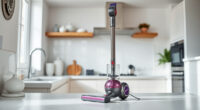
Congratulations on your new Dyson V15 Detect™ Origin Cordless Vacuum! This powerful and intelligent cleaning tool is designed for whole-home deep cleaning, revealing invisible dust and adapting to different floor types. Proper setup ensures you get the best performance and longevity from your device. In this guide, we’ll walk you through the entire setup process, from unpacking to initial use, with helpful tips to keep your vacuum functioning optimally.

Get home appliances delivered free with Prime
- Fast, free delivery on millions of items
- Prime Video, Amazon Music and more included
- Member-only deals all year
Whether you’re a first-time Dyson user or upgrading from an older model, following these clear, practical steps will ensure a safe and effective setup experience.
Key Takeaways
| Powerful and Intelligent | Reveals invisible dust and adapts to debris with LCD screen insights. |
| Long Battery Life | Provides up to 60 minutes of runtime with energy-efficient power trigger. |
| Two Advanced Cleaner Heads | Includes Fluffy Optic and Digital Motorbar for versatile cleaning. |
| Easy Conversion | Transforms into a handheld for cleaning cars, stairs, and upholstery. |
| Additional Attachments | Comes with a crevice tool for tricky edges and hard-to-reach spots. |
Unpack and Check the Contents
- Carefully remove the Dyson V15 Detect™ Origin vacuum from its packaging and place it on a clean, flat surface.
- Verify all components are included: the main vacuum unit, two cleaner heads (the Fluffy Optic and Digital Motorbar), the crevice tool, and any additional accessories.
- Inspect each part for any visible damage or defects before proceeding.
Charge the Battery Fully
Connect the included charger to a power outlet and attach it to the charging port on the vacuum handle. Allow the vacuum to charge until the LCD screen indicates full battery status—usually around 4 hours.
Charging fully before first use ensures maximum runtime and performance. Avoid using extension cords not rated for the charger’s power needs to ensure safety.
Assemble Your Dyson V15 Detect™
- Attach the desired cleaner head (the Fluffy Optic for hard floors or the Motorbar for carpets) by aligning the locking mechanism and pushing until it clicks securely into place.
- If you plan to do handheld cleaning, detach the main wand by pressing the release button and attach the handheld unit directly to the cleaner head or accessories.
- Attach the crevice tool to the handheld unit or wand for detailed edge cleaning.
Power On and Configure Settings
Press the power trigger to turn on the vacuum. The LCD screen will display the current power mode, remaining run time, and debris detection insights.
Adjust the power mode using the button on the handle if needed. The Dyson V15 Detect™ intelligently adapts power based on debris detected, but you can manually override this for specific tasks.
Perform a Test Run and Maintenance Check
Run the vacuum over a small section of your cleaning area to ensure everything is functioning correctly. Check the LCD for any maintenance alerts or filter replacements needed.
Clean the filters and empty the bin after use to maintain optimal suction and performance. Refer to the maintenance section for filter cleaning and replacement tips.
The Products in This Guide

Dyson V15 Detect™ Origin Cordless Vacuum
- ✔ Color: Nickel/Gold
- ✔ Material: Polycarbonate, aluminum
- ✔ Warranty: 2 years

LANMU Crevice Tool Vacuum Attachments Compatible
- ✔ Durability: High-strength plastic
- ✔ Ease of Use: Quick attach/detach
- ✔ Versatility: Suitable for multiple surfaces
Dyson V15 Detect™ Origin Cordless Vacuum
The Dyson V15 Detect™ Origin offers powerful suction, intelligent debris detection, and versatile attachments that make it ideal for comprehensive home cleaning. Its LCD display keeps you informed, ensuring optimal operation at all times.
Pros:
- Powerful suction with 100% more power
- Smart debris detection and LCD insights
- Long battery life of up to 60 minutes
- Includes two advanced cleaner heads
- Transforms into a handheld for versatile cleaning
Cons:
- Higher price point compared to basic models
- Requires regular filter maintenance
- Heavier than some handheld-only vacuums
Best for: Whole-home cleaning, pet hair, hard floors, carpets
Not ideal for: Light-duty quick cleans or very small spaces
Bottom line: A powerful, smart vacuum perfect for deep cleaning across various floor types.
LANMU Crevice Tool Vacuum Attachments Compatible
The LANMU Crevice Tool Vacuum Attachments are compatible with Dyson V15 models and help reach into narrow spaces like car seats, baseboards, and upholstery. Its slender profile makes it easy to maneuver into small corners and tight gaps.
Pros:
- Narrow, flexible nozzle for hard-to-reach spots
- Compatible with multiple Dyson models
- Easy to attach and use
- Effective for detailed cleaning
Cons:
- Only compatible with certain Dyson models
- No additional attachments included
Best for: Cleaning tight corners, car interiors, and furniture gaps
Not ideal for: Large surface cleaning or heavy debris
Bottom line: A practical addition for detailed, hard-to-reach cleaning tasks.
Frequently Asked Questions
How do I know when my Dyson V15 Detect™ needs maintenance?
The vacuum’s LCD screen will display maintenance alerts, such as filter replacement or bin full notifications. Regularly check and clean filters and empty the bin after each use to ensure peak performance.
Can I use my Dyson V15 on all floor types?
Yes, the Dyson V15 Detect™ is designed to adapt automatically to different floor types. It includes two advanced cleaner heads: the Fluffy Optic for hard floors and the Digital Motorbar for carpets, which can be swapped as needed.
How long does the battery last on a full charge?
The Dyson V15 Detect™ provides up to 60 minutes of run time with a fully charged battery, depending on the power mode and usage.
Can I convert my Dyson V15 to a handheld vacuum?
Absolutely. Simply detach the main wand and attach the handheld unit directly to the cleaner head or accessories for targeted cleaning of stairs, upholstery, or car interiors.
What should I do if the vacuum isn’t picking up debris effectively?
First, check the filter and bin for obstructions and clean or empty as necessary. Also, ensure the cleaner heads are properly attached and free of hair or debris that could block airflow.
Keep Your Dyson V15 Detect™ Running at Its Best
Setting up your Dyson V15 Detect™ Origin correctly ensures you enjoy its full cleaning potential and longevity. Regular maintenance, proper assembly, and understanding its features will make your cleaning routines more efficient and effective. With this setup, you’re ready to tackle any mess with confidence and ease.
Affiliate disclosure: As an Amazon Associate we earn from qualifying purchases. Prices and availability are accurate as of the time of publishing.
Halloween Picks
halloween
As an affiliate, we earn on qualifying purchases.