TL;DR

Get home appliances delivered free with Prime
- Fast, free delivery on millions of items
- Prime Video, Amazon Music and more included
- Member-only deals all year
Smart home security cameras let you check a property remotely and receive alerts, but their usefulness depends on placement, connection, detection quality, and recording access. Compare power, storage costs, compatibility, and privacy controls before buying; a carefully placed camera with reliable alerts often serves you better than a high-resolution model aimed at the wrong spot.
A 4K camera can still miss the delivery at your front door if a porch light throws glare across its lens. The view and alerts matter as much as the pixels.
Smart home security cameras let you check on a home remotely and receive alerts about movement, people, pets, vehicles, or packages, depending on the model. Some record continuously; others save clips when they detect activity. Many connect to a phone app and can work with lights, alarms, doorbells, and voice assistants. [1]
This guide helps you choose a camera that suits your rooms, power access, internet connection, and comfort with cloud storage. You’ll also learn how to place it, compare recording options, and protect footage that may show family members, visitors, or passersby.
Choose indoor or outdoor models based on the actual mounting environment, power access, and weather exposure.
Judge image quality using the camera’s view, lighting, lens, and connection as well as resolution.
Check whether saved clips require a subscription and how local or cloud recordings behave during outages.
Aim cameras at your property, review audio rules, and secure access with unique passwords and two-factor authentication.
Test Wi-Fi, alerts, and night footage before you rely on the camera.
Choose a camera that fits the place you want to watch
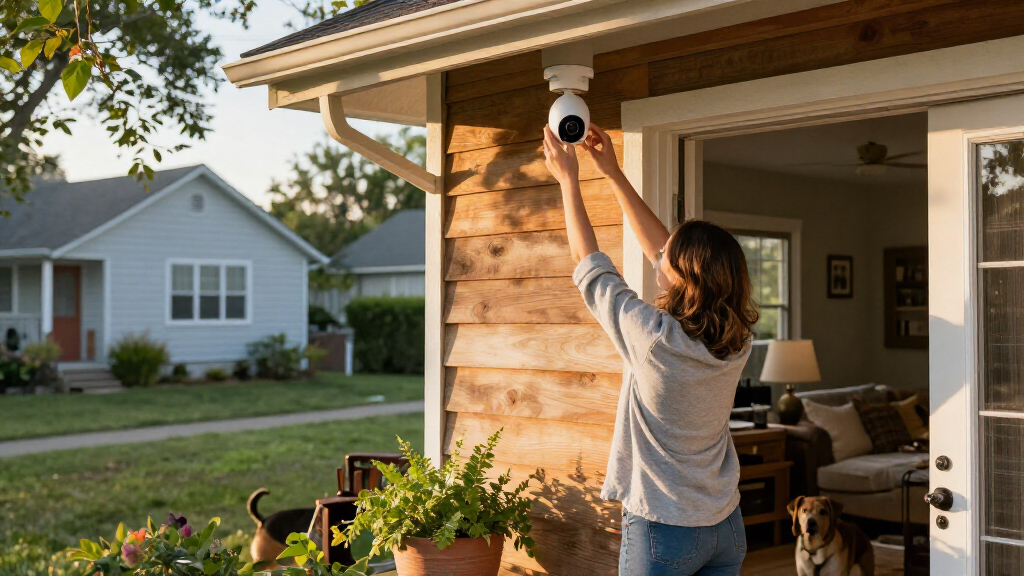
Smart home security cameras work best when their design matches the place you want to watch: outdoor models need weather protection and suitable temperature ratings, while indoor models can offer privacy shutters or recording controls. Before you compare video quality, decide whether the camera will face a porch, a garage, a living room, or another space. [1]
Picture a camera over a front entrance. An outdoor-rated unit can handle rain and seasonal temperatures, while an indoor camera behind a window may reflect its own infrared night vision back into the lens. That reflection can turn a clear night view into a bright blur, so a window-facing indoor camera may be unsuitable even if its daytime picture looks fine. A privacy shutter can help in a living room where you want the option to physically cover the lens when you are home; check whether the shutter is physical or only a software setting, since they offer different levels of reassurance.
Power changes where a camera can go and how much attention it needs later. A battery model is easier to mount away from an outlet, but frequent motion alerts, weak Wi-Fi, cold weather, and heavy use can all affect how often you recharge it. A camera placed high or in a difficult-to-reach spot may make that routine inconvenient. A wired camera avoids routine charging and can support continuous operation, though it needs a reliable power source. Some doorbell cameras use existing wiring; other installations may require electrical work.
Check the job before you buy: will it watch a defined entrance, cover a dark yard, or let you check on a pet? The answer helps determine whether you need a wide outdoor view, a privacy control, or a camera that can run for long periods without attention. If installing wiring, working near mains power, or changing a doorbell circuit, switch off power where appropriate and use a licensed professional when the job calls for one. Follow manufacturer instructions and local electrical and building rules. [1]
As an affiliate, we earn on qualifying purchases.Products Worth Considering

Arlo Pro Wireless Security Camera, 2K HDR, 6th Generation, 4-Camera Kit

Philips Hue Festavia Globe Outdoor String Lights, 8 Bulbs, 22 ft

eufy Security Essential Alarm System, 7-Piece
Get clearer evidence by matching the camera to its view
Smart home security cameras provide more useful detail when resolution, lighting, lens quality, field of view, placement, and network performance work together. Resolution affects how much image detail a camera can capture, but it cannot fix a washed-out porch light or a view that places the doorway at the edge of the frame. A high-resolution image of a person who occupies only a few pixels may still be too vague to identify them. [1]
Think of the camera view as a window. A wide view may show the whole driveway, but people and faces can appear small. A narrower angle may show a visitor clearly at the door while missing movement near the side gate. This is a coverage tradeoff: one camera rarely gives both a broad overview and close detail everywhere. For a concrete test, stand where a delivery driver would pause and check whether the camera can show a face, package, and useful part of the entrance at once. If it cannot, adjust the position or consider whether another view is needed.
Night vision brings its own tradeoffs. Infrared light typically produces a black-and-white picture in darkness. A built-in light can produce color images, but it may annoy neighbors or create glare on nearby surfaces. A porch with a warm bulb can look very different from a pitch-black path, so review sample footage taken under lighting conditions like yours. The practical goal is not simply color; it is enough usable detail without a light source that creates new problems.
Before fixing the camera in place, check the live view on your phone at different times of day. Move it a few inches if a roof edge blocks the sky or the sun washes out the image. Also check whether the image remains smooth and alerts arrive promptly at that location: a camera may record good video locally yet struggle to upload clips over a weak connection. That small adjustment can matter more than paying for a higher resolution.
Pick alerts that tell you what needs your attention
Smart home security cameras can flag movement or, on some models, identify categories such as people, pets, vehicles, and packages. More specific detection may cut down on irrelevant alerts, but results vary by product and conditions. A swaying tree, passing headlights, or a pet crossing the room can still produce unwanted notifications. The value of an alert depends on whether it helps you decide what to do; repeated false alarms can make important notifications easier to ignore. [1]
Imagine checking your phone during a meeting and seeing five alerts from a branch moving in the wind. A camera that lets you set activity zones can ignore the tree while watching the front path. You might also choose person alerts for an entrance and pet alerts for a room where a dog naps. These choices make alerts more relevant, but a zone drawn too narrowly can exclude the very approach you meant to monitor.
Detection can depend on angle, distance, shadows, and software features that may require a subscription. A camera aimed straight across a busy sidewalk may send alerts for every passerby; one tilted toward your own doorway can make the same detection setting more helpful. Give yourself a few days to see which alerts are useful before you fine-tune sensitivity. If you reduce sensitivity too much to quiet nuisance alerts, a camera may miss smaller or more distant movement, so review actual clips rather than judging only by how quiet your phone becomes.
Some newer models process certain events on the device rather than sending all analysis to a cloud service. That can reduce reliance on cloud processing for those features, but it does not tell you on its own where video is stored or who can access it. Check which features work locally and which need an internet connection, a compatible hub, or a paid plan. This matters during an internet outage: local detection may continue while remote alerts or clip uploads stop. [1]
Compare recording options before you pay every month
Smart home security cameras may offer live viewing without a subscription, while saved video, longer history, or advanced detection can cost extra. Recording might go to cloud storage, a memory card, or a local hub. Compare the recurring plan, retention period, device requirements, and access during an outage before you choose. These details determine whether you can retrieve the clip when you need it, not just whether the camera can record. [1]
Here’s a common choice: a renter wants to save clips of deliveries but doesn’t want another monthly bill. A camera with a memory card or local hub may fit, if its recordings remain available when the internet goes down and the device keeps power. Local storage can avoid a recurring fee, but the camera or card may be stolen or damaged along with the footage. Someone who wants to review events remotely might prefer cloud history, while accepting the plan’s cost, retention limits, internet dependence, and account security needs.
| Recording option | What it can offer | What to check |
|---|---|---|
| Cloud | Remote clip access and a provider-hosted history | Plan fees, retention, internet needs, and account security |
| Memory card | Local recordings without relying on a cloud plan | Card capacity, camera access, and what happens if the camera is stolen |
| Local hub | Central storage that may support several devices | Hub cost, compatibility, power needs, and outage behavior |
Ask what happens when the router, power, or company service fails. Remote live viewing and cloud services generally need internet, though some cameras can record locally during an outage. Local recordings may still be inaccessible remotely until the connection returns, and power loss can stop both recording and access unless backup power is available. The answer depends on the model, so read the product’s storage details instead of assuming every clip will be saved. [1]
Protect your footage while respecting other people’s privacy
Smart home security cameras can capture more than your own doorway: they may record visitors, neighbors, delivery workers, or passersby. You can reduce unnecessary recording by pointing cameras toward your property, limiting activity zones, and reviewing how audio and video recording work under local rules. This reduces the amount of footage you collect and the number of people who may be affected if an account or device is accessed improperly. [1]
For example, a camera over a shared entrance might catch a neighbor’s window or a stretch of public pavement. Adjust the angle or privacy zones if the app offers them. A camera indoors can also feel intrusive to people who share your home, so explain when it records and how they can tell it is active. Privacy zones can hide parts of an image, but check whether they apply to both live viewing and saved clips, since implementations differ.
Audio deserves special attention. Two-way audio can help you speak to a visitor or tell a delivery driver where to leave a package, but recording conversations may be subject to local law and consent requirements. Review local rules before enabling audio recording, especially in shared spaces or when visitors may not know a microphone is active. If you only need to speak through the camera, check whether the device supports live two-way audio without saving audio in recordings.
Protect accounts with a strong, unique password and two-factor authentication where available. Review who can view clips, use a secure Wi-Fi password, install software updates, and check how long data stays on the provider’s servers. Each shared account expands the number of people and devices that can reach the footage, so remove access when it is no longer needed. A camera is only one part of the system; account security and sensible access settings help protect the recordings it collects. [1]
Set up your camera in five practical steps
Smart home security cameras are easier to live with when you choose the view, power, connection, recording, and alert settings before relying on them. A few minutes of setup can prevent a week of useless alerts or a camera that quietly loses connection. Use these steps to test the system around your actual routine.
- Choose one clear purpose. For instance, watch the front step for deliveries rather than trying to cover an entire yard with one camera. A defined purpose gives you a way to judge whether the view and alerts are working.
- Check the mounting spot. Confirm weather suitability outdoors, nearby power for wired models, and a useful view of the approach. Consider whether you can safely reach a battery camera when it needs charging.
- Test Wi-Fi at the camera location. A weak signal can interrupt live viewing and uploads; check the app’s connection before drilling or fastening a mount. A camera that connects only intermittently may leave gaps precisely when it needs to send a clip.
- Set recording and alerts. Choose cloud or local storage, an appropriate retention period, and activity zones that avoid irrelevant movement. Confirm which settings require a subscription so you know what will continue working after any trial ends.
- Review after a normal day. Check recordings at daytime and after dark, then adjust angle, sensitivity, or lighting if clips miss the action. Test a real approach to the entrance instead of assuming the live preview shows how a moving person will appear.
Say you install a battery camera by the garage. After one evening, you notice car headlights trigger alerts from the street. A small angle change and a narrower activity zone can focus alerts on the driveway. Recheck battery use after the first week, since frequent triggers can mean more charging; if the camera is still alerting constantly, the placement or detection settings may be creating avoidable work.
If a setup requires new electrical wiring or roof work to reach a mounting point, use a qualified professional. Shut off power before electrical work, use appropriate protective equipment, and follow local permit and code requirements. A secure camera should never come at the cost of a risky installation.
Frequently Asked Questions
Do smart home security cameras work without Wi-Fi?
Remote live viewing and cloud services generally need an internet connection. Some models can record locally during an outage, but check the product details to learn whether you can access those clips and what happens if power also fails. [1]
Do I need a subscription to use a smart camera?
Not always. Some cameras offer live viewing and local recording without a recurring fee, while cloud video history or advanced detection may require a plan. Compare the features you need with the ongoing cost before buying. [1]
Where should I place a home security camera?
Start with useful views such as entrances and shared areas, then test the live image before fixing the mount. Aim toward your own property where possible and avoid recording neighbors’ private spaces. Check how the view looks at night as well as during the day. [1]
Are battery cameras as reliable as wired cameras?
Either can work well, but they depend on different things. Battery life can change with activity, signal strength, settings, and temperature; wired models avoid recharging but need continuous power. Choose based on the mounting location and how often you can check or charge the device. [1]
How can I make a smart camera harder to hack?
No connected device is risk-free, but a unique password, two-factor authentication, secure Wi-Fi, and prompt software updates reduce exposure. Review which household members or shared accounts can access recordings, too. [1]
Conclusion
Choose a camera by the job it needs to do: show a clear view, send alerts you can act on, and save recordings in a way that fits your budget and privacy needs. Test the angle, connection, and night footage before you trust it to watch an entrance or a room.
A well-placed camera should give you a useful glimpse of what happened, then fade into the background of your day.