Smart home learning devices can adapt temperature schedules, respond to voice commands, and bring basic controls into one place. I rank the Google Nest Learning Thermostat (4th Gen) with Nest Temperature Sensor as the best overall for buyers who want adaptive climate control across rooms. The Amazon Echo Dot Max stands out for voice-first control and sound, while the Amazon Smart Home Starter Kit offers a more direct entry into connected lighting and plugs. The main tradeoff is choosing between a device that learns a specific routine, a hub or speaker that coordinates broader tasks, and a simpler option that takes less setup. Read on for the full breakdown and help matching a pick to your home.

Get home appliances delivered free with Prime
- Fast, free delivery on millions of items
- Prime Video, Amazon Music and more included
- Member-only deals all year
Complete the kit


Key Takeaways
The Nest Learning Thermostat bundle is the climate-control leader: its included room sensor makes it a better fit for homes where one thermostat reading does not represent every room.
Echo Dot Max models prioritize voice control and audio: they suit Alexa-centered homes, but they do not replace the room-by-room temperature learning of a thermostat.
The Smart Home Starter Kit lowers the setup barrier: pairing an Echo Hub with a plug and bulbs gives beginners several device types to try, though its included set may not cover a whole home.
Amazon Smart Thermostat is the more focused Alexa climate pick: Ring and Alexa compatibility make it relevant to existing Amazon households, while buyers should verify wiring and system compatibility before choosing any thermostat.
Several listings are color variants, not different feature tiers: the Nest thermostat and Echo Dot Max choices should be compared by function and finish, rather than treating each color as a separate capability upgrade.
| Google Nest Smart Thermostat, Snow |  | Best Value for Simple Scheduling | Color: Snow | Connectivity: Wi-Fi (2.4 GHz and 5 GHz), Bluetooth Low Energy | Power source: Battery powered | VIEW LATEST PRICE | See Our Full Breakdown |
| Google Nest Learning Thermostat (4th Gen) with Nest Temperature Sensor (2nd Gen), Silver |  | Best Overall for Adaptive Comfort | Color: Polished silver | Controller compatibility: Amazon Alexa, Android, Apple HomeKit, Google Assistant, iOS | System compatibility: Most 24V systems, including gas, electric, oil, forced air, heat pump, and radiant | VIEW LATEST PRICE | See Our Full Breakdown |
| Amazon Echo Dot Max (newest model) – Alexa speaker with immersive sound and smart home hub, Amethyst |  | Best for Voice-Led Smart Home Learning | Color: Amethyst | Sound: Room-filling sound with nearly 3x the bass of the previous model | Technology: Omnisense, eero Built-in | VIEW LATEST PRICE | See Our Full Breakdown |
| Google Nest Smart Thermostat, Programmable Wi-Fi, Charcoal | 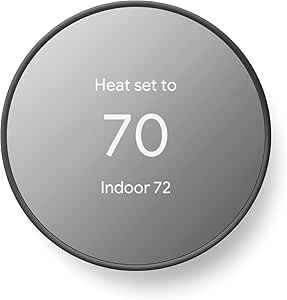 | Best for Straightforward DIY Setup | Color: Charcoal | Connectivity: Wi-Fi (2.4 GHz and 5 GHz), Bluetooth Low Energy | Compatible platforms: Google Home, Android, iOS, Google Assistant, Matter-certified voice assistants | VIEW LATEST PRICE | See Our Full Breakdown |
| Google Nest Learning Thermostat (4th Gen) with Nest Temperature Sensor (2nd Gen), Obsidian |  | Best Premium Finish | Color: Polished Obsidian | Controller compatibility: Amazon Alexa, Android, Apple HomeKit, Google Assistant, iOS | Temperature control: Heating and cooling | VIEW LATEST PRICE | See Our Full Breakdown |
| Amazon Smart Thermostat with Alexa and Ring Compatibility |  | Best for Alexa-Based Climate Control | Model: S6ED3R | Dimensions: 3.56 x 3.56 x 0.84 in | Weight: 3.86 oz | VIEW LATEST PRICE | See Our Full Breakdown |
| Amazon Echo Dot Max (Newest Model) – Alexa Speaker with Room-Filling Sound and 3x Bass, Glacier White |  | Best for Learning Through Everyday Smart-Home Use | Color: Glacier White | Sound: Room-filling sound with nearly 3x bass versus Echo Dot (2022) | Smart home hub: Built-in | VIEW LATEST PRICE | See Our Full Breakdown |
| Amazon Echo Dot Max (Newest Model) – Alexa Speaker with Room-Filling Sound and 3x Bass, Graphite |  | Best for Alexa+ and Connected-Home Routines | Color: Graphite | Sound: Room-filling sound with nearly 3x bass | Smart home hub: Built-in | VIEW LATEST PRICE | See Our Full Breakdown |
| Amazon Echo Spot (Newest Model) – Smart Alarm Clock with Alexa, Glacier White | 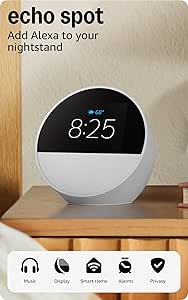 | Best Compact Bedside Smart-Home Teacher | Condition: Refurbished | Dimensions: 4.5 x 4.1 x 4.4 in | Weight: 14.3 oz | VIEW LATEST PRICE | See Our Full Breakdown |
| Amazon Smart Home Starter Kit with Echo Hub, Smart Plug, and 4 Smart Bulbs |  | Best Complete Kit for Hands-On Smart-Home Learning | Included devices: Echo Hub, Amazon Smart Plug, and 4 Amazon Basics smart bulbs | Display: 8-inch touchscreen, 1280 x 800 resolution | Connectivity: Dual-band Wi-Fi, Bluetooth, Zigbee, Thread, and Matter controller | VIEW LATEST PRICE | See Our Full Breakdown |
| smart home learning device | Color | Display | Connectivity |
|---|---|---|---|
| Google Nest Smart Thermostat | Snow | 1.07-inch LCD | Wi-Fi (2.4 GHz and 5 GHz), Bluetooth Low Energy |
| Google Nest Learning Thermosta | Polished silver | 3.5-inch touchscreen | Wi-Fi |
| Amazon Echo Dot Max | Amethyst | — | — |
| Google Nest Smart Thermostat | Charcoal | 2-inch LCD | Wi-Fi (2.4 GHz and 5 GHz), Bluetooth Low Energy |
| Google Nest Learning Thermosta | Polished Obsidian | Touchscreen | Wi-Fi |
| Amazon Smart Thermostat with A | — | — | — |
| Amazon Echo Dot Max | Glacier White | — | — |
| Amazon Echo Dot Max | Graphite | — | — |
| Amazon Echo Spot | — | 2.83-inch touchscreen, 240 x 320 pixels | — |
| Amazon Smart Home Starter Kit | — | 8-inch touchscreen, 1280 x 800 resolution | Dual-band Wi-Fi, Bluetooth, Zigbee, Thread, and Matter controller |
More Details on Our Top Picks
Google Nest Smart Thermostat, Snow
For buyers who want a thermostat to teach them basic energy-saving habits without learning their routine automatically, the Google Nest Smart Thermostat keeps the job straightforward. Its Google Home app schedule and away-based temperature adjustment let you connect everyday choices—like leaving home—with heating and cooling use. Compared with the Nest Learning Thermostat (4th Gen), this Snow model skips the learning features and included room sensor, so it is less suited to correcting uneven temperatures across rooms. In return, its simpler controls and DIY-oriented setup make it a practical starting point for a connected home. The tradeoff is HVAC compatibility: many systems work without a C wire, but some require one or a power accessory. App, voice, and remote features also depend on Wi-Fi and internet access.
Pros:- Away-based temperature adjustment can help reduce heating or cooling when the home is empty
- Google Home app supports remote control and scheduled temperature changes
- Works with Google Assistant, Alexa, and Matter-certified voice assistants
- Designed for DIY installation
Cons:- Some heating, cooling, zone-controlled, and heat-pump systems may need a C wire or compatible power accessory
- Remote control, notifications, and voice features depend on working internet and Wi-Fi
Best for: Homeowners who want app-based scheduling and away adjustments on a compatible HVAC system, without needing automatic schedule learning or room-to-room sensing
Not ideal for: Households with hot and cold spots that need a room sensor, or owners of HVAC systems that require a C wire or power accessory
- Color:Snow
- Connectivity:Wi-Fi (2.4 GHz and 5 GHz), Bluetooth Low Energy
- Power source:Battery powered
- Voltage:24 volts
- Display:1.07-inch LCD
- Control methods:Buttons, voice, Google Home app
- Compatible systems:Heating and cooling; heat pump
- Smart home compatibility:Google Assistant, Alexa, Matter-certified voice assistants
- C wire:Not required in most homes; may be required for some systems
Our verdict“Choose this Snow model for accessible app scheduling and away adjustments, but pick the Nest Learning Thermostat if automatic learning or room sensing matters more.”
Google Nest Learning Thermostat (4th Gen) with Nest Temperature Sensor (2nd Gen), Silver
This is the strongest fit for households that want temperature control to respond to both routines and room differences. The Nest Learning Thermostat (4th Gen) learns temperature preferences and schedules, while its included 2nd-gen Nest Temperature Sensor can help address a bedroom or other space that does not match the thermostat’s reading. That gives it a broader comfort role than the standard Google Nest Smart Thermostat, which relies on a schedule you create and does not include a room sensor. The larger touchscreen and support for a wide range of 24V systems add flexibility, though compatibility still needs checking against the specific HVAC setup. Its extra learning and sensing features may be unnecessary for people who want only simple remote scheduling, and Wi-Fi is needed for app-based control.
Pros:- Learns temperature preferences and supports automatic scheduling
- Included sensor can help manage differences between rooms
- Supports app and voice control across listed platforms
- Compatible with many 24V heating and cooling system types
Cons:- Specific HVAC compatibility should be checked before installation
- Learning and room-sensor functions add complexity for buyers who only need a simple schedule
Best for: Households with changing routines or rooms that run warmer or cooler than the thermostat area, especially those with a compatible 24V system
Not ideal for: Buyers seeking only basic app scheduling, or anyone unwilling to check HVAC compatibility before installation
- Color:Polished silver
- Controller compatibility:Amazon Alexa, Android, Apple HomeKit, Google Assistant, iOS
- System compatibility:Most 24V systems, including gas, electric, oil, forced air, heat pump, and radiant
- Connectivity:Wi-Fi
- Voltage:24 volts
- Display:3.5-inch touchscreen
- Mounting type:Wall mount
- Included sensor:Nest Temperature Sensor (2nd gen)
- Energy certification:ENERGY STAR
Our verdict“Pick the Silver learning model when adaptive scheduling and room-to-room comfort justify its added features over the standard Nest thermostat.”
Amazon Echo Dot Max (newest model) – Alexa speaker with immersive sound and smart home hub, Amethyst
The Echo Dot Max makes sense for someone who learns a smart home by asking questions and controlling devices by voice, rather than by adjusting a thermostat schedule. Its built-in smart home hub and device-pairing features give Alexa a central role, while Omnisense supports personalized experiences. It also combines those controls with room-filling sound and eero Built-in mesh Wi-Fi extension, a wider mix of functions than either Google Nest thermostat in this roundup. That flexibility is useful if you want one device for audio and smart-home interaction, but it is not a substitute for the Nest models’ direct heating and cooling controls or learning schedules. The larger footprint can be awkward in a small room, and buyers should weigh always-listening microphones against their privacy preferences.
Pros:- Room-filling sound with nearly three times the bass of the previous model
- Built-in smart home hub supports device pairing and home theater integration
- eero Built-in can extend mesh Wi-Fi coverage
- Omnisense supports personalized experiences
Cons:- Does not replace a thermostat for direct heating and cooling schedules
- Larger size may not suit small spaces
- Always-listening microphones may not suit privacy-sensitive households
Best for: Alexa households that want a voice-first smart-home hub with substantial audio, device pairing, and possible mesh Wi-Fi extension
Not ideal for: Buyers looking specifically for automatic HVAC scheduling, room-temperature sensing, or a compact device for a small surface
- Color:Amethyst
- Sound:Room-filling sound with nearly 3x the bass of the previous model
- Technology:Omnisense, eero Built-in
- Smart home features:Smart home hub and device pairing
- Home theater integration:Supported
- Voice assistant:Alexa; Alexa+ support listed
- Network feature:Mesh Wi-Fi extender functionality
Our verdict“Choose the Echo Dot Max for Alexa-led device control and stronger audio, not for the dedicated temperature learning offered by the Nest thermostats.”
Google Nest Smart Thermostat, Programmable Wi-Fi, Charcoal
For buyers who want a familiar programmable thermostat with app access, the Charcoal Google Nest Smart Thermostat puts scheduling and away-based adjustments ahead of automatic learning. It can help households build an energy-conscious routine through the Google Home app, and its stated DIY installation approach makes it a more direct fit than the feature-richer Nest Learning Thermostat (4th Gen). The learning model is the better choice if you want the thermostat to adapt to preferences or use an included sensor to manage room differences; this one keeps control centered on its own temperature reading and your schedule. It supports heating and cooling and lists heat-pump compatibility, but some installations still need a C wire or compatible power accessory. Remote and voice functions also rely on internet and Wi-Fi.
Pros:- Away adjustments can reduce heating or cooling while the home is unoccupied
- Google Home app enables remote control and scheduling
- Supports voice control and smart-home integration
- Designed for DIY installation and includes batteries
Cons:- Some HVAC systems require a C wire or compatible power accessory
- Remote control and notifications depend on internet and Wi-Fi
- Does not include the learning features or room sensor supplied with the 4th-gen Learning Thermostat
Best for: DIY-minded homeowners with a compatible heating or cooling system who prefer to set their own schedule in Google Home
Not ideal for: People seeking automatic schedule learning, a room sensor, or an installation that cannot support the required power setup
- Color:Charcoal
- Connectivity:Wi-Fi (2.4 GHz and 5 GHz), Bluetooth Low Energy
- Compatible platforms:Google Home, Android, iOS, Google Assistant, Matter-certified voice assistants
- Temperature control:Heating and cooling
- Compatible system:Heat pump
- Power source:Battery powered
- Batteries:2 A batteries, included
- Display:2-inch LCD
- Programmable:Yes
Our verdict“Choose the Charcoal model for hands-on scheduling and DIY-oriented setup; move up to the Learning Thermostat if you want adaptive routines or room sensing.”
Google Nest Learning Thermostat (4th Gen) with Nest Temperature Sensor (2nd Gen), Obsidian
The Obsidian Nest Learning Thermostat offers the same core learning-and-sensing approach as the Silver 4th-gen model, so its distinction is primarily a darker finish rather than a different smart-home role. It learns temperature preferences and routines, and the included 2nd-gen temperature sensor can help make a frequently used room more comfortable when the thermostat’s location does not reflect it. Compared with the Google Nest Smart Thermostat, Charcoal, this model adds adaptive scheduling and room sensing, while the Charcoal option favors simpler programmed control. The Obsidian listing describes a touchscreen and aluminum construction, but provides less display detail than the Silver listing. Compatibility can vary by HVAC system, and some schedule changes may require approval, so buyers wanting fully hands-off adjustments may prefer the simpler expectations of a set schedule.
Pros:- Learns temperature preferences and household routines
- Included 2nd-gen sensor can help address hot and cold spots
- Supports app and voice control
- Aluminum construction and Polished Obsidian finish offer a distinct look
Cons:- HVAC compatibility can vary and should be checked before installation
- Some schedule changes may require user approval
- The listing provides limited display details compared with the Silver version
Best for: Design-conscious households wanting a dark-finish learning thermostat and an included sensor for room-to-room comfort
Not ideal for: Buyers who only need basic scheduling, prefer to avoid schedule approvals, or have not confirmed compatibility with their HVAC system
- Color:Polished Obsidian
- Controller compatibility:Amazon Alexa, Android, Apple HomeKit, Google Assistant, iOS
- Temperature control:Heating and cooling
- Connectivity:Wi-Fi
- Power source:Battery powered
- Voltage:24 volts
- Display:Touchscreen
- Included accessory:Nest Temperature Sensor (2nd gen)
- Material:Aluminum
Our verdict“Choose Obsidian for the learning features and included room sensor in a dark finish, but compare it with the Silver version if finish is not a priority.”
Amazon Smart Thermostat with Alexa and Ring Compatibility
Schedules and app-based adjustments make this thermostat a practical way to learn how routine changes affect home comfort. It can adjust temperature using schedules or compatible temperature and presence readings, and the Alexa app offers guided installation. Compared with the Google Nest Learning Thermostat (4th Gen), this model is more directly tied to Alexa and Ring controls, while the Nest option is the better fit for shoppers already building around Google’s thermostat ecosystem. The tradeoff is that this Amazon model does not learn on its own from the information supplied here: buyers set schedules and automatic adjustments, and voice control needs a separate Alexa device. Check HVAC compatibility before buying, since it supports most 24V systems but not 110–240V baseboard heat. A C-wire or separately sold power adapter is also required, and Wi-Fi is limited to 2.4 GHz.
Pros:- Schedules, vacation mode, and emergency heat mode support varied household routines.
- Temperature and presence readings can trigger automatic adjustments.
- Alexa app guidance supports installation and ongoing control.
- ENERGY STAR and ECOLOGO Gold certifications.
Cons:- Needs a C-wire or a separately sold power adapter kit.
- Connects only to 2.4 GHz Wi-Fi, not 5 GHz.
- Voice control requires a separate compatible Alexa device.
Best for: Households with a compatible 24V HVAC system that already use Alexa or Ring and want app-managed schedules and presence-based temperature adjustments.
Not ideal for: Homes with electric baseboard heating, no C-wire or power adapter plan, or a 5 GHz-only Wi-Fi setup; also a poor fit for buyers who want voice control without a separate Alexa device.
- Model:S6ED3R
- Dimensions:3.56 x 3.56 x 0.84 in
- Weight:3.86 oz
- HVAC compatibility:Most 24V systems; not 110–240V systems such as electric baseboard heat
- Power requirement:C-wire or separately sold power adapter kit
- Wi-Fi:2.4 GHz, 802.11 b/g/n; no 5 GHz support
- Controls:Alexa app, Ring app, compatible Alexa device voice control, and three touch buttons
- Certifications:ENERGY STAR and ECOLOGO Gold
Our verdict“Choose this thermostat for scheduled, app-led climate control in an Alexa household with compatible 24V HVAC and the required power connection.”
Amazon Echo Dot Max (Newest Model) – Alexa Speaker with Room-Filling Sound and 3x Bass, Glacier White
The Glacier White Echo Dot Max combines room-filling audio with a built-in smart home hub, so it can serve as both a listening device and a voice-control point for compatible equipment. Omnisense adds personalized experiences, while eero Built-in can extend Wi-Fi coverage by up to 1,000 square feet. Compared with the more display-focused Echo Spot, this model is better suited to shared rooms where music and hands-free controls matter more than a clock screen. Its learning value comes from using Alexa to explore compatible devices and routines, not from a dedicated teaching curriculum. The larger form may crowd a small nightstand, and the hub and extender benefits depend on having compatible smart-home devices and network equipment. Buyers wanting a compact alarm-clock-style screen should look at the Echo Spot instead.
Pros:- Room-filling sound with nearly three times the bass of Echo Dot (2022).
- Built-in smart home hub supports compatible device control.
- Omnisense technology supports personalized experiences.
- eero Built-in can extend Wi-Fi coverage up to 1,000 sq. ft.
Cons:- Its size may be a poor fit for small shelves or nightstands.
- Smart-home functions depend on compatible devices.
- Wi-Fi extension is most useful within a compatible eero setup.
Best for: Households seeking a shared-room Alexa speaker that can also introduce compatible smart-home controls, routines, and Wi-Fi extension.
Not ideal for: Buyers who need a compact bedside display, have no compatible smart-home devices, or want smart-home learning content rather than hands-on use of Alexa controls.
- Color:Glacier White
- Sound:Room-filling sound with nearly 3x bass versus Echo Dot (2022)
- Smart home hub:Built-in
- Technology:Omnisense and eero Built-in
- Wi-Fi coverage:Up to 1,000 sq. ft.
Our verdict“Pick the Glacier White Echo Dot Max if you want a shared-room Alexa speaker that also gives a household a practical entry point to compatible smart-home controls.”
Amazon Echo Dot Max (Newest Model) – Alexa Speaker with Room-Filling Sound and 3x Bass, Graphite
The Graphite Echo Dot Max is a sound-first smart-home hub for households that want music and voice control in the same room. Omnisense supports personalized routines, and the listed Alexa+ support adds a distinction not stated for the Glacier White listing. Built-in eero can extend Wi-Fi up to 1,000 square feet, while compatibility with Amazon Music, Apple Music, Spotify, and SiriusXM gives listeners several ways to use it day to day. Compared with the Echo Hub in the Smart Home Starter Kit, this speaker is less suited to visual, touch-based device control; its strength is hands-free access paired with immersive sound. It still needs compatible smart devices to make its hub useful, and its larger footprint and higher cost than smaller Echo devices may be hard to justify if routines or music are not priorities.
Pros:- Room-filling audio with nearly 3x bass.
- Built-in smart home hub supports compatible devices.
- Omnisense technology supports personalized routines.
- Lists Alexa+ support, multiple streaming services, and microphone privacy controls.
Cons:- May take up too much room in compact spaces.
- Full smart-home utility depends on compatible devices.
- Costs more than smaller Echo devices according to the product description.
Best for: Alexa households that want a room-filling music speaker, hands-free smart-home control, and Omnisense-supported routines in one device.
Not ideal for: Buyers who prefer a touchscreen control panel, have few compatible smart devices, or need a small and simple bedside speaker.
- Color:Graphite
- Sound:Room-filling sound with nearly 3x bass
- Smart home hub:Built-in
- Technology:Omnisense and Alexa+ support
- Wi-Fi extension:eero Built-in, up to 1,000 sq. ft.
- Streaming compatibility:Amazon Music, Apple Music, Spotify, and SiriusXM
- Privacy:Microphone enable/disable button and privacy controls
Our verdict“Choose the Graphite Echo Dot Max if hands-free routines and strong room audio matter more than a screen-based control panel.”
Amazon Echo Spot (Newest Model) – Smart Alarm Clock with Alexa, Glacier White
The Glacier White Echo Spot puts Alexa controls and routines on a small touchscreen, making it a natural bedside companion for learning how connected devices respond to voice commands and schedules. Its 2.83-inch display can show customizable clock faces, while the speaker handles alarms and audio without taking over a nightstand. Compared with the Echo Dot Max, it gives up room-filling sound and a listed built-in smart home hub in favor of a compact screen and clock-first design. The Spot is refurbished, so buyers should weigh that condition against the included features. It has no camera, which may appeal to privacy-conscious users, but it is not a visual monitoring device. Its eero Wi-Fi extension requires a compatible eero router, and the limited Bluetooth support may rule out some PIN-protected speakers.
Pros:- Compact touchscreen with customizable clock faces.
- Alexa voice control supports routines and compatible smart-home management.
- No camera, with privacy controls listed in the product description.
- eero Built-in can extend coverage up to 1,000 sq. ft. with a compatible setup.
Cons:- Refurbished condition may not suit buyers seeking a new device.
- Wi-Fi extension requires a compatible eero router and is limited to up to 100 Mbps.
- Limited Bluetooth support excludes PIN-protected speakers.
Best for: People who want a compact bedside or desk device for Alexa routines, basic smart-home controls, alarms, and a small visual display.
Not ideal for: Buyers who need powerful room audio, camera-based monitoring, broad Bluetooth speaker compatibility, or Wi-Fi extension without a compatible eero router.
- Condition:Refurbished
- Dimensions:4.5 x 4.1 x 4.4 in
- Weight:14.3 oz
- Display:2.83-inch touchscreen, 240 x 320 pixels
- Camera:No camera
- Wi-Fi:Dual-band 802.11a/b/g/n/ac, 2.4 and 5 GHz
- Speaker:Full-range 1.73-inch speaker
- eero Built-in:Up to 1,000 sq. ft. and speeds up to 100 Mbps
Our verdict“Choose the Echo Spot for bedside learning through simple Alexa routines and visible controls, not for high-powered audio or broad connectivity.”
Amazon Smart Home Starter Kit with Echo Hub, Smart Plug, and 4 Smart Bulbs
This kit makes smart-home learning concrete: the Echo Hub touchscreen, smart plug, and four bulbs let newcomers practice controlling several kinds of devices and building Alexa routines from one bundle. Its 8-inch display gives controls more room than the Echo Spot, while Zigbee, Thread, and Matter support make the Hub a more capable central interface for compatible equipment. Unlike a speaker-led option such as the Echo Dot Max, this is built around touch-based device management rather than room-filling audio. That breadth comes with practical limits: setup needs internet access, the kit is not portable, and the stand is sold separately. Compatibility still matters, so buyers should check that their existing devices work with the supported standards before expecting every product to connect.
Pros:- Bundles an Echo Hub, Amazon Smart Plug, and four Amazon Basics smart bulbs.
- 8-inch touchscreen provides a dedicated visual control point.
- Supports Wi-Fi, Bluetooth, Zigbee, Thread, and Matter devices.
- Alexa routines can coordinate compatible connected devices.
Cons:- Internet access is required for setup.
- Stand is sold separately.
- Designed for fixed placement rather than handheld or portable use.
Best for: First-time smart-home builders who want a central touchscreen, starter lighting and plug devices, and a way to practice routines across compatible equipment.
Not ideal for: Shoppers who want a portable device, already own a complete smart-home setup, lack reliable internet for setup, or expect a stand to be included.
- Included devices:Echo Hub, Amazon Smart Plug, and 4 Amazon Basics smart bulbs
- Display:8-inch touchscreen, 1280 x 800 resolution
- Connectivity:Dual-band Wi-Fi, Bluetooth, Zigbee, Thread, and Matter controller
- Dimensions:7.9 x 5.4 x 0.6 in
- Weight:12.9 oz
- Power:12.5 W power adapter included
- Setup requirement:Internet connection via Wi-Fi or Ethernet
- Warranty:1-year limited warranty
Our verdict“Choose this kit if you want a ready-made, touch-controlled starting point for learning routines across compatible lights and plug-in devices.”

How We Picked
I compared these devices by the kind of learning or control they add to a home: adaptive heating and cooling, voice-led routines, room-level sensing, or a guided starting point for lights and plugs. I prioritized practical usefulness, ease of setup, ecosystem fit, and the value of included accessories, while accounting for likely limitations such as compatibility checks, narrow use cases, and dependence on a specific assistant.
The ranking favors options that deliver a clear benefit beyond a single isolated task. The Nest Learning Thermostat bundle ranks highest for its combination of adaptive climate control and an extra room sensor. Echo Dot Max earns a strong position for broader voice and smart-home interaction, while the starter kit ranks well for first-time setup but below specialized picks for buyers with an established system. Color-only variants are treated as equivalent in capability, and simpler thermostats rank lower when they offer less learning or room-level coverage.
| smart home learning device | Connectivity |
|---|---|
| Google Nest Smart Thermostat | Wi-Fi (2.4 GHz and 5 GHz), Bluetooth Low Energy |
| Google Nest Learning Thermosta | Wi-Fi |
| Amazon Echo Dot Max | — |
| Google Nest Smart Thermostat | Wi-Fi (2.4 GHz and 5 GHz), Bluetooth Low Energy |
| Google Nest Learning Thermosta | Wi-Fi |
| Amazon Smart Thermostat with A | — |
| Amazon Echo Dot Max | — |
| Amazon Echo Dot Max | — |
| Amazon Echo Spot | — |
| Amazon Smart Home Starter Kit | Dual-band Wi-Fi, Bluetooth, Zigbee, Thread, and Matter controller |
Factors to Consider When Choosing Smart Home Learning Devices
These products do not all teach a home the same way: some adapt heating schedules, while others make connected devices easier to command or get started with. I would choose by the problem you want solved first, then check ecosystem, compatibility, and how much setup you are willing to take on.
Choose the kind of learning you actually need
The phrase “learning device” can mean automatic adjustment, saved routines, or simply a central voice interface. A thermostat is the more direct choice if the goal is to reduce repeated temperature adjustments; a speaker or hub is more useful when lights, plugs, and voice commands matter more. Do not assume a smart speaker will learn your comfort preferences like a thermostat. Likewise, a thermostat will not coordinate every household device by itself. Start with one recurring frustration, then choose the device category that addresses it without adding features you will not use.
Check compatibility before buying a thermostat
Thermostat compatibility depends on the heating and cooling equipment, wiring, and sometimes the configuration of the home. Check the manufacturer’s compatibility guidance before ordering, especially if your system uses multiple stages, a heat pump, or unusual wiring. A product that supports a learning schedule still cannot help if it does not work with the installed system. If you rent or cannot alter wiring, a speaker, display, or plug-based starter set may be a simpler route. Treat compatibility as a go/no-go check, not a feature to sort out after installation.
Match the ecosystem to devices you already own
Voice assistants are most useful when they can control the devices and services already in your home. Alexa-focused products make the most sense for households that already use Alexa or compatible Ring devices, while Nest thermostats fit buyers drawn to Google’s climate-control tools. A mixed ecosystem can work, but it may mean separate apps, uneven voice support, or more setup. Before choosing a hub or speaker, list the smart bulbs, locks, and sensors you expect to add next. Buying around that future list can prevent a central device from becoming a voice-only accessory.
Decide whether room-level sensing matters
A thermostat’s location can give a poor picture of comfort in bedrooms, upstairs rooms, or sunlit spaces. A separate room sensor can help represent a space that the main thermostat does not capture, but it does not make every room independently controlled. Think about when and where comfort problems occur before paying for extra sensing. If the temperature is already consistent throughout the home, the added sensor may bring little practical benefit. If room differences are a recurring issue, prioritize sensor support over a more elaborate speaker feature set.
Plan for setup, maintenance, and household habits
Smart devices ask for different kinds of ongoing attention: thermostats need a suitable installation and sensible schedules, while speakers and hubs need reliable connectivity and routine device management. A starter kit can reduce the number of separate purchases, but its included bulbs and plug may not suit every fixture or room. Consider who will set up the system and whether other household members will use voice commands, apps, or physical controls. Avoid connecting every device at once if you are new to smart-home setup; adding a few at a time makes problems easier to identify. The most useful system is the one your household can maintain without turning simple tasks into troubleshooting.
Pay for coverage and compatibility, not duplicate features
Spend more when an added component solves a specific gap, such as a sensor for an uncomfortable room or a hub that consolidates devices you plan to use. A second Echo Dot Max in another color does not add a new capability, and buying multiple speakers before deciding where voice control is useful can create overlap. Beginners may get more value from a starter kit than from assembling separate devices, while an established smart home may benefit more from one targeted upgrade. Compare what is included with what you already own. The best fit is the smallest setup that covers your real routines and leaves room to expand.
Frequently Asked Questions
Should I choose a learning thermostat or a smart speaker first?
Choose a thermostat first if repeated temperature changes or uneven comfort are the main problem. Choose a smart speaker or hub if your priority is voice control across lights, plugs, and other compatible devices. These product types serve different jobs, so one does not automatically replace the other. If you are unsure, begin with the task that happens most often and is most frustrating. You can add the other category later once you know which routines you want to automate.
Do I need the Nest Temperature Sensor if my home has one thermostat?
You may not need it if the thermostat’s location reflects the comfort of the rooms you use most. A sensor is more relevant when bedrooms or other spaces regularly feel warmer or cooler than the thermostat area. It can provide another room reading for the system to use, but it does not create a separate thermostat for each room. Think about where people spend time and when temperature differences matter, such as overnight. If the problem is isolated to one room, compare sensor support with other ways to address that room before buying.
Can I mix Google Nest and Alexa devices in one home?
Many households can use devices from both ecosystems, but shared control and automation may vary by product and service. Before mixing them, confirm that the specific devices you want to pair support the same platform or connection method. Expect that some features may remain in separate apps or respond differently to voice commands. A mixed setup can be reasonable if you already own useful devices from both brands. For a new system, choosing one main assistant can reduce setup work and make household routines easier to manage.
Is the Amazon Smart Home Starter Kit enough to outfit a whole home?
The kit is better viewed as a starting point than a complete whole-home setup. Its Echo Hub, plug, and bulbs can help you learn how device control and routines fit your habits, but the number of included accessories may not cover every room. Check whether the bulbs match your fixtures and whether the plug suits the appliance you want to control. If you already own compatible devices, the kit may fill gaps; if not, plan for gradual additions. Starting with one high-use room can help you learn what to expand next.
What should I check before installing a smart thermostat?
Confirm that the thermostat supports your heating and cooling system and that your wiring matches the manufacturer’s requirements. Pay particular attention to heat pumps, multi-stage systems, and older installations, where compatibility can be less straightforward. Also check whether installation requires a common wire or another power arrangement. If you are uncertain about the wiring, consult an HVAC professional rather than guessing. A compatibility check before purchase can prevent an avoidable installation problem and narrow the choices to models suited to your equipment.
Conclusion
For best overall, I would choose the Google Nest Learning Thermostat (4th Gen) with Nest Temperature Sensor when adaptive climate control and room-level readings are the priority. The best value for Alexa-centered homes is the Amazon Smart Thermostat, provided the heating system is compatible; for a first smart-home setup, the Amazon Smart Home Starter Kit offers the clearest entry point. The Echo Dot Max is my best premium voice-and-audio pick for buyers who want a capable Alexa speaker as a home-control center, while the simpler Google Nest Smart Thermostat suits buyers who want connected temperature scheduling without the bundled sensor. For a bedside routine, choose the Echo Spot; skip color variants as a reason to pay for a different capability, since their role is primarily finish selection.